
Operator Library: Hardware Platform
AppletPropertiesオペレータには、入力も出力もありません。このオペレータは、アプレットおよびボードのハードウェア構成を制御します。
このオペレータは、アプレットを記述する一連のパラメータを提供します。一部の値はユーザー定義ですが、その他の値は自動的に生成されます。
このオペレータはすべての設計において必須であり、VisualAppletsによって自動的にインスタンス化されます。このオペレータは削除できません。
| ハードウェアプラットフォームで使用可能 |
|---|
| imaFlex 2 Dual 100 |
| imaFlex CXP-12 Penta |
| imaFlex CXP-12 Quad |
| mE5 marathon VCLx |
| mE5 marathon VCL |
| mE5 marathon VCX-QP |
| mE5 marathon VF2 |
| LightBridge VCL |
| mE5 ironman VQ8-CXP6D |
| mE5 ironman VQ8-CXP6B |
| mE5 ironman VD8-PoCL |
![[注]](../common/images/admon/note.png) |
使用可能なパラメーター |
|---|---|
|
AppletPropertiesオペレータは、ハードウェアプラットフォームごとに特定のパラメータセットを提供します。 以下のパラメータ説明では、どのハードウェアプラットフォームがどのパラメータをサポートしているかを示しています。制限が指定されていない場合、そのパラメータはすべてのプラットフォームでサポートされます。 |
| VisualAppletsVersion(すべてのプラットフォーム) | |
|---|---|
| タイプ | static read parameter |
| Default | N/A |
| 範囲 | N/A |
|
使用されているVisualAppletsのバージョン番号。 |
|
| ProjectName(すべてのプラットフォーム) | |
|---|---|
| タイプ | static read parameter |
| Default | N/A |
| 範囲 | N/A |
|
Designメニューのメニュー項目Propertiesで指定されたプロジェクトの名前。 |
|
| AppletVersion(すべてのプラットフォーム) | |
|---|---|
| タイプ | static read parameter |
| Default | N/A |
| 範囲 | N/A |
|
Designメニューのメニュー項目Propertiesで指定されたバージョン。 |
|
| AppletVendor(すべてのプラットフォーム) | |
|---|---|
| タイプ | static read parameter |
| Default | N/A |
| 範囲 | N/A |
|
このオペレータのModule Propertiesダイアログで直接、アプレットのベンダーに関する情報を入力できます。 |
|
| AppletAuthor(すべてのプラットフォーム) | |
|---|---|
| タイプ | static read parameter |
| Default | N/A |
| 範囲 | N/A |
|
このオペレータのModule Propertiesダイアログで直接、アプレットの作成者に関する情報を入力できます。 |
|
| BuildTime(すべてのプラットフォーム) | |
|---|---|
| タイプ | static read parameter |
| Default | N/A |
| 範囲 | N/A |
|
BuildTimeパラメータは、アプレットがビルドされた日時(最新のネットリスト生成の日時)を示す自動生成された文字列です。 パラメータの値は、Framegrabber SDKでのみ確認できます。次の画像は、文字列のフォーマットを示しています。 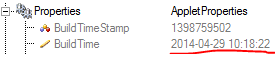 |
|
| AppletUid(すべてのプラットフォーム) | |
|---|---|
| タイプ | static read parameter |
| Default | N/A |
| 範囲 | N/A |
|
アプレットの固有ID。ビルドするたびに新しいIDが作成されます(前提条件チェックが設定されている場合)。 |
|
| FrontGpiPullControl03 / FrontGpiPullControl47(imaFlex 2 Dual 100プラットフォーム) | ||||
|---|---|---|---|---|
| タイプ | 動的、静的書き込みパラメータ | |||
| Default | PullUp | |||
| 範囲 | {PullUp, PullDown} | |||
|
このパラメータは、差動またはシングルエンドのどちらで構成されているかに関係なく、フロントスロットのGPI信号のプルアップおよびプルダウン抵抗(20 kOhm)を制御します。GPIをPullUpまたはPullDownの状態に設定できます。 プル抵抗は、GPIピンが外部から駆動されていない場合、または外部ドライバの電源起動がフレームグラバーよりも遅い場合のGPIピンの電圧レベルを定義します。外部ドライバが接続されている場合は、20 kOhmのプル抵抗を上書きするのに十分なドライブ能力が必要です。 FrontGpiPullControl03パラメータはGPIグループチャネルA(GPIピン0〜3)の動作を制御し、FrontGpiPullControl47パラメータはGPIグループチャネルB(GPIピン4〜7)の動作を制御します。 プル抵抗が正常に機能するには、外部GPIOの電源を適切なコネクタピン(グループチャネルAまたはチャネルBのGPI電圧INおよびGPIグラウンドIN)に接続する必要があります。
|
||||
| FrontGpiType03 / FrontGpiType47(imaFlex 2 Dual 100プラットフォーム) | ||||
|---|---|---|---|---|
| タイプ | 動的、静的書き込みパラメータ | |||
| Default | SingleEnded | |||
| 範囲 | {SingleEnded, Differential} | |||
|
このパラメータは、GPIピンが差動モードとシングルエンドモードのどちらで動作するかを制御します。FrontGpiType03パラメータはグループチャネルA(GPIピン0〜3)を管理し、FrontGpiType47パラメータはグループチャネルB(GPIピン4〜7)を管理します。 SingleEndedモードでは、各GPIピンは変更されずにVisualAppletsに渡されるため、グループ内の4つのピンすべてを独立して使用できます。 Differentialモードでは、偶数番号のGPIピンと次の奇数番号のピンが組み合わされて、VisualApplets内で差動チャネルを形成します。差動モードが有効な場合、偶数ピンが差動信号を伝送し、奇数ピンはネガティブペアの状態のみを表すため無視できます。
|
||||
| FiberPortProtocol0 / FiberPortProtocol1(imaFlex 2 Dual 100プラットフォーム) | ||||
|---|---|---|---|---|
| タイプ | static write parameter | |||
| Default |
QSFP28[0]: CoF QSFP28[1]: DataForwarding |
|||
| 範囲 | {CoF, DataForwarding} | |||
|
このパラメータは、フレームグラバーの対応するQSFP28ポートのファイバープロトコルを定義します。ポート0は通常カメラ接続(CoF)に使用され、ポート1は別のフレームグラバーへのデータ転送に使用されます。スレーブフレームグラバーでは通常、両方のポートがDataForwardingに設定されます。 CoFはCoaXPress over Fiber(CXP 3.0規格)の略です。DataForwardingは、フレームグラバー間の通信のためのBaslerのプロトコルです。どちらのプロトコルもレーンあたり25 Gbit/sをサポートし、QSFP28ポートあたり100 Gbit/sを実現します。 特殊な条件の下では、2台の100 Gbit/sカメラを1台のフレームグラバーに接続することが可能です。これらのセットアップには特定の要件を満たす必要があります。ただし、フレームグラバーは、PCIe経由でホストメモリまたはGPUにデータを転送する前に、前処理を実行して結果の帯域幅を少なくとも半分に削減する必要があります。 PCIeは約13 GB/sの実効帯域幅を提供し、単一のQSFP28ポートは約12.5 GB/sを提供します。2つのQSFP28ポートを合わせると約25 GB/sの内部帯域幅が生成されますが、これは前処理と帯域幅の削減なしにはPCIe経由で転送できません。さらに、ボードのRAMシステムにより、RAMを同時にストリーミングできるデータ量に追加の制限が課されます。 データ転送機能の詳細については、'Data Forwarding with imaFlex 2 Dual 100 Frame Grabbers'を参照してください。
|
||||
| DesignClock(すべてのimaFlexプラットフォーム) | ||||
|---|---|---|---|---|
| タイプ | static read parameter | |||
| Default | 312.5 | |||
| 範囲 | [312.5; 400.0] | |||
|
このパラメータは、メガヘルツ単位の設計システムクロック周波数を表します。設計システムクロック周波数は、VisualAppletsのDesignメニュー、Change FPGA Clockメニュー項目で変更できます。135 MHzよりも高い周波数設定を使用すると、タイミング違反が発生する可能性があります。この場合は周波数を下げてください。
|
||||
| DesignClock(mE5 marathonおよびLightBridge VCLプラットフォーム) | ||||
|---|---|---|---|---|
| タイプ | static read parameter | |||
| Default | 125 | |||
| 範囲 | [125;312.5] | |||
|
このパラメータは、メガヘルツ単位の設計システムクロック周波数を表します。設計システムクロック周波数は、VisualAppletsのDesignメニュー、Change FPGA Clockメニュー項目で変更できます。135 MHzよりも高い周波数設定を使用すると、タイミング違反が発生する可能性があります。この場合は周波数を下げてください。
|
||||
| ExtensionGpioType (imaFlex CXP-12 Quad および imaFlex CXP-12 Penta プラットフォーム) | |||||||
|---|---|---|---|---|---|---|---|
| タイプ | 動的書き込みパラメータ | ||||||
| Default | OpenDrain | ||||||
| 範囲 | {OpenDrain, PushPull} | ||||||
|
このパラメータを使用すると、外部拡張 GPIO コネクタの回路タイプを選択できます。PushPull モードでは、GPIO は直接駆動されます。
|
|||||||
| FrontGpioPullControl (imaFlex CXP-12 Penta プラットフォーム) | ||||
|---|---|---|---|---|
| タイプ | 動的書き込みパラメータ | |||
| Default | PullUp | |||
| 範囲 | {PullUp, PullDown} | |||
|
|
||||
| FrontGpioType (imaFlex CXP-12 Penta プラットフォーム) | ||||
|---|---|---|---|---|
| タイプ | 動的書き込みパラメータ | |||
| Default | SingleEnded | |||
| 範囲 | {SingleEnded, Differential} | |||
|
|
||||
| FrontGpioInversion (imaFlex CXP-12 Penta プラットフォーム) | ||||
|---|---|---|---|---|
| タイプ | 動的書き込みパラメータ | |||
| Default | Off | |||
| 範囲 | {On, Off} | |||
|
|
||||
| PcieInterfaceType (ironman プラットフォーム) | ||||
|---|---|---|---|---|
| タイプ | static write parameter | |||
| Default | Generation_2 | |||
| 範囲 | {Generation_1, Generation_2} | |||
|
PcieInterfaceType パラメータを使用すると、PCIe インターフェイスのタイプ、したがってサポートされる DMA 帯域幅を選択できます。 Generation_2(デフォルト)は PCIe Generation 2 プロトコルを表し、3,600,000 バイト/秒の帯域幅を提供します。 Generation_1 は PCIe Generation 1 プロトコルを表し、1,800,000 バイト/秒の帯域幅を提供します。 Generation_1 デザインは、使用する FPGA リソースがわずかに少なくなります。Generation_1 デザインを使用するアプレットの方が、タイミング収束を達成するのがはるかに簡単です。Generation_2 は最大のパフォーマンスを提供しますが、アプレットのタイミング収束を達成することがより難しくなります。タイミングを満たすために、複数回の配置配線合成実行が必要になる場合があります。
|
||||
| PcieInterfaceType(mE5 marathonおよびLightBridge VCLプラットフォーム) | ||||
|---|---|---|---|---|
| タイプ | static write parameter | |||
| Default | Generation_2 | |||
| 範囲 | {Generation_1, Generation_2} | |||
|
PcieInterfaceType パラメータを使用すると、PCIe インターフェイスのタイプ、したがってサポートされる DMA 帯域幅を選択できます。 Generation_1: The applet only supports PCIE generation 1. Thus, the maximum DMA transmission bandwidth is ca. 900 MByte/s (1MByte = 1^10Byte). The DmaToPC operator is limited so that LinkParallelism x LinkPixelWidth needs to be <= 64 bit. Generation_2: The applet supports PCIE generation 2. Thus, the maximum DMA transmission bandwidth is ca. 1800 MByte/s (1MByte = 1^10Byte). The DmaToPC operator is limited so that LinkParallelism x LinkPixelWidth needs to be <= 128 bit. Generation_1の実装は、Generation_1の実装よりもリソース消費量が少なくなります。Generation_1モードは、Generation_2の高い帯域幅を必要としない一方でリソースが不足しているデザインに役立ちます。
|
||||
| GpioType(mE5 marathonおよびironmanプラットフォーム) | |||||||
|---|---|---|---|---|---|---|---|
| タイプ | 動的書き込みパラメータ | ||||||
| Default | OpenDrain | ||||||
| 範囲 | {OpenDrain, PushPull} | ||||||
|
このパラメータを使用すると、ユーザーは外部GPIOコネクタの回路タイプを選択できます。PushPullモードでは、GPIOが直接駆動されます。
|
|||||||
| BuildTimeStamp(すべてのプラットフォーム - 非表示) | ||||
|---|---|---|---|---|
| タイプ | static write parameter | |||
| Default | N/A | |||
| 範囲 | N/A | |||
BuildTimeStampは、自動的に生成される識別番号です。これは32ビットのTimestampであり、ロードされたアプレットとロードされたアプレットランタイム環境の間の一貫性をチェックするために、実行時にアプレットから読み出すことができます。 |
||||
| ProjectNameHash(すべてのプラットフォーム - 非表示) | ||||
|---|---|---|---|---|
| タイプ | static read parameter | |||
| Default | N/A | |||
| 範囲 | N/A | |||
ProjectNameのエントリに対する32ビットのハッシュ(デザインメニュー、プロパティメニュー項目)。この値は、ロードされたアプレットとロードされたアプレットランタイム環境の間の一貫性をチェックするために、実行時にアプレットから読み出すことができます。 |
||||
| AppletUidHigh(すべてのプラットフォーム - 非表示) | ||||
|---|---|---|---|---|
| タイプ | static read parameter | |||
| Default | N/A | |||
| 範囲 | N/A | |||
パラメータAppletUidは128ビットの数値です。この数値の上位64ビットがAppletUidHighとして数値で出力されます。 |
||||
| AppletUidLow(すべてのプラットフォーム - 非表示) | ||||
|---|---|---|---|---|
| タイプ | static read parameter | |||
| Default | 1 | |||
| 範囲 | {0; 2^32 – 1} | |||
パラメータAppletUidは128ビットの数値です。この数値の下位64ビットがAppletUidLowとして数値で出力されます。 |
||||
オペレータAppletPropertiesの使用方法については、以下の例をご覧ください。
-
例 - ベーシックアクジッション
-
例 - ベーシックアクジッション
-
例 - ベーシックアクジッション
-
例 - ベーシックアクジッション
 前へ
前へ

