
Operator Library: Hardware Platform
GPO オペレーターは、デジタル出力へのインターフェースを提供します。Pin_ID / PinID パラメータ(パラメータ名はハードウェアプラットフォームによって異なります)を介して、信号の送信に使用するデジタル出力(GPIOユニットの物理ピンに配線されている)を選択します。
imaFlex プラットフォームを除くすべてのプラットフォームの場合: 2つの GPIO ユニットを備えたフレームグラバーを使用する場合は、ConnectorType パラメータを使用して、アドレス指定する GPIO ユニット(GPIO または Front GPIO)を選択します。imaFlex 2 Dual 100、imaFlex CXP-12 Quad、および imaFlex CXP-12 Penta プラットフォームでは、ConnectorType パラメータは使用できません。
各デジタル出力は1回のみ使用できます。したがって、選択したデジタル出力は、GPO オペレーターの単一のインスタンスによって排他的に使用される必要があります。
![[注]](../common/images/admon/note.png) |
imaFlex 2 Dual 100 プラットフォームのフロント GPO ポートグループ |
|---|---|
|
imaFlex 2 Dual 100 プラットフォームのフロント GPO ポートは、2つの独立したグループに分かれています:
|
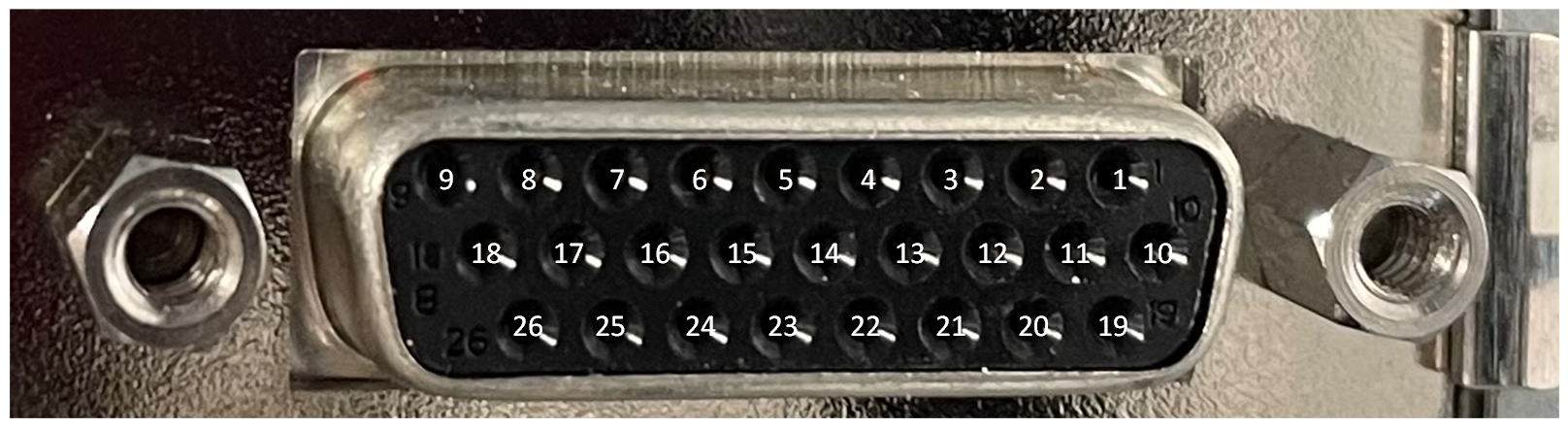
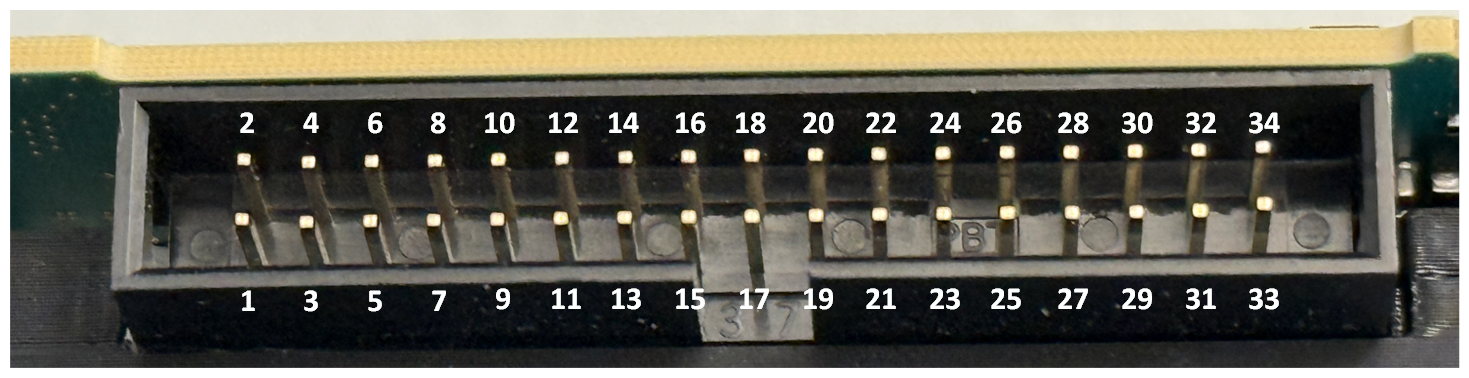
デジタル入力とピンコネクタの対応付けについては、フレームグラバーのユーザーマニュアルの GPIO Connectors トピックを参照してください。imaFlex 2 Dual 100 プラットフォームについては、GPIO Connectors (CoF Frame Grabbers) を参照してください。
| ハードウェアプラットフォームで使用可能 |
|---|
| imaFlex 2 Dual 100 |
| imaFlex CXP-12 Penta |
| imaFlex CXP-12 Quad |
| mE 5 marathon VCLx |
| mE 5 marathon VCL |
| mE 5 marathon VCX-QP |
| mE 5 marathon VF2 |
| LightBridge VCL |
| mE 5 ironman VQ8-CXP6D/-CXP6B |
| mE 5 ironman VD8-PoCL |
| pixelPlant 100 |
| pixelPlant 200 |
リソース
このオペレーターの FPGA デバイスリソースは、PinID パラメータの値と等しくなります。 メニューから ダイアログを開くと、FPGA デバイスリソースを確認できます。デバイスリソースは読み取り専用です:
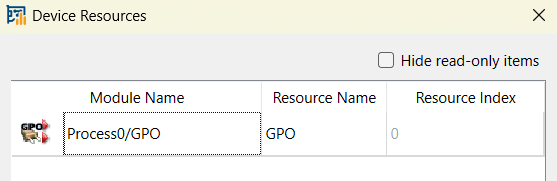
imaFlex 2 Dual 100 プラットフォームの場合、リソースのタイプは GPO であり、インデックスは Front GPIO コネクタの場合は 0 ~ 7、Extension GPIO コネクタの場合は 8 ~ 15 です。
各デジタル出力に対して、TriggerOut タイプのリソースが1つ使用されます。デバイスリソースの完全なリストについては、Device Resources を参照してください。
| Link Parameter | Input Link I |
|---|---|
| Bit Width | 1 |
| Arithmetic | unsigned |
| Parallelism | 1 |
| Kernel Columns | 1 |
| Kernel Rows | 1 |
| Img Protocol | VALT_SIGNAL |
| Color Format | VAF_GRAY |
| Color Flavor | FL_NONE |
| Max. Img Width | any |
| Max. Img Height | any |
| PinID(すべてのimaFlexプラットフォーム) | ||||||||||||||||||||||||||||||||||||||||||||||||||||
|---|---|---|---|---|---|---|---|---|---|---|---|---|---|---|---|---|---|---|---|---|---|---|---|---|---|---|---|---|---|---|---|---|---|---|---|---|---|---|---|---|---|---|---|---|---|---|---|---|---|---|---|---|
| タイプ | static write parameter | |||||||||||||||||||||||||||||||||||||||||||||||||||
| Default | FrontGpo0 | |||||||||||||||||||||||||||||||||||||||||||||||||||
| 範囲 |
imaFlex 2 Dual 100: {FrontGpo0, FrontGpo1, FrontGpo2, FrontGpo3, FrontGpo4, FrontGpo5, FrontGpo6, FrontGpo7, ExtensionGpo0, ExtensionGpo1, ExtensionGpo2, ExtensionGpo3, ExtensionGpo4, ExtensionGpo5, ExtensionGpo6, ExtensionGpo7} imaFlex CXP-12 Penta: {FrontGpo0, FrontGpo1, FrontGpo2, FrontGpo3, ExtensionGpo0, ExtensionGpo1, ExtensionGpo2, ExtensionGpo3, ExtensionGpo4, ExtensionGpo5, ExtensionGpo6, ExtensionGpo7} imaFlex CXP-12 Quad:{FrontGpo0, FrontGpo1, ExtensionGpo0, ExtensionGpo1, ExtensionGpo2, ExtensionGpo3, ExtensionGpo4, ExtensionGpo5, ExtensionGpo6, ExtensionGpo7} |
|||||||||||||||||||||||||||||||||||||||||||||||||||
|
PinID パラメータを介して、信号の送信に使用するデジタル出力(GPIO ソケットの物理ピンに配線されている)を定義します。同じデジタル出力は1回のみ、つまり GPO オペレーターの1つのインスタンスによってのみ使用できます。 FrontGpoN は、Front GPIO コネクタの GPO を表します。 ExtensionGpoN は、Extension GPIO サイドコネクタの GPO を表します。 デジタル入力とピンコネクタのマッピングについては、フレームグラバーのユーザーマニュアルの GPIO Connectors トピックを参照してください。imaFlex 2 Dual 100プラットフォームについては、GPIO Connectors (CoF Frame Grabbers) を参照してください。
|
||||||||||||||||||||||||||||||||||||||||||||||||||||
| Pin_ID (mE5 platforms, pixelPlant and LightBridge VCL) | ||||
|---|---|---|---|---|
| タイプ | static write parameter | |||
| Default | 0 | |||
| 範囲 | [0;7], [0;3] または [0;1] | |||
|
パラメータ Pin_ID を介して、信号の送信に使用するデジタル出力(GPIOまたはFrontGPIOソケット上の物理ピンに配線されている)を定義します。同じデジタル出力は、1回のみ(つまりGPOオペレータの1つのインスタンスによってのみ)使用できます。 [0;7] marathon 上の GPIO を指定する場合、または GPIO ユニットが 1 つしかないデバイス (ironman、Pixelplant) を使用する場合、値の範囲は 0 ~ 7 です。 [0;3] LightBridge 上の GPIO を指定する場合、値の範囲は 0 ~ 3 です。 [0;1] marathon または LightBridge 上の Front GPIO を指定する場合、値の範囲は 0 ~ 1 です。
|
||||
| ConnectorType (mE5 marathon and LightBridge VCL platforms) | ||||
|---|---|---|---|---|
| タイプ | static write parameter | |||
| Default | GPIO | |||
| 範囲 | {GPIO, FrontGPIO} | |||
|
パラメータ ConnectorType を使用して、パラメータPin_IDに入力する値でアドレス指定するGPIOソケット(GPIO または Front GPIO)を定義します。
|
||||
GPO オペレータの使用法を次の例に示します。
-
'Area Scan Trigger for microEnable 5 marathon VCX QP'
CoaXPress 用のエリアスキャントリガーを示します。 トリガーの生成には、外部ソース、内部周波数ジェネレータ、またはソフトウェアトリガーパルスを使用できます。
-
'Area Scan Trigger for imaFlex CXP-12 Quad'
CoaXPress12向けエリアスキャントリガーについて説明します。 トリガーの生成には、外部ソース、内部周波数ジェネレーター、またはソフトウェアトリガーパルスを使用できます。
-
' Line Scan Trigger for microEnable 5 marathon VCL with TrgBoxLine Operator Usage'
シンプルなデザインでのTrgBoxLineオペレータの使用方法を示すVisualAppletsデザイン例。
-
'Line Scan Trigger for microEnable 5 marathon VCX QP with TrgBoxLine Operator Usage'
シンプルなデザインでのTrgBoxLineオペレータの使用方法を示すVisualAppletsデザイン例。
-
'Line Scan Trigger for imaFlex CXP-12 Quad with TrgBoxLine Operator Usage'
シンプルなデザインでのTrgBoxLineオペレータの使用方法を示すVisualAppletsデザイン例。
 前へ
前へ

