ハードウェアのインストール (CoaXPressカメラ)#
カメラのモデルに応じて、最大4つのCoaXPress接続を確立できます。
一般的な考慮事項#
Basler CoaXPressカメラを操作するには、以下のソフトウェアおよびハードウェアコンポーネントをインストールする必要があります。
- Basler pylon Software Suite。
必要なpylonのバージョンの詳細については、お使いのカメラモデルに関するトピックを参照してください。カメラのトピックは、エリア・ラインスキャンカメラセクションにあります。 - acquisition card
- 適切なアクセサリー
次の表に、Baslerポートフォリオの適切なフレームグラバーまたはインターフェイスカード、およびアクセサリーの一覧を示します。
情報
- 利用可能なアクセサリーの範囲の概要については、Baslerウェブサイトのレンズ、照明、およびアクセサリーのページもご覧ください。データおよびI/Oケーブルは、さまざまな長さのものをご用意しています。CoaXPressデータケーブルは、ケーブルベア対応バージョンもご用意しています。
- 他社製のフレームグラバーを使用することもできます。その場合は、適切にインストールを行うために、該当するメーカーのマニュアルを参照してください。フレームグラバーは、CoaXPress規格に完全に準拠している必要があります。Baslerでは、最大ストリームパケットサイズが1 KByte以上のデバイスを使用することをお勧めします。
- boost R カメラ向けに、BaslerではBasler CXP-12 Evaluation Kit boostも提供しています。このプロダクトバンドルは、boostカメラモデルに適したコンポーネントをより簡単にお選びいただけるように設計されています。
カメラの取り付け#
始める前に#
ハードウェアの取り付けを開始する前に、次のものが使用可能であることを確認してください。
- Basler CoaXPressカメラ。
- フレームグラバーまたは適切なインターフェースカードを搭載したコンピューター。
- インターフェースカードまたはフレームグラバーを介してカメラに電源を供給する場合(Power over CoaXPress (PoCXP))、インターフェースカードまたはフレームグラバーがコンピューターの電源に接続されていることを確認してください(この情報は racer 2 XL カメラには適用されません)。
- PoCXPを使用しない場合は、外部電源が必要です。電源がカメラモデルに関するトピックに記載されている要件を満たしていることを確認してください。カメラに関するトピックは、エリアスキャンおよびラインスキャンカメラセクションにあります。
- 必要に応じて、適切なレンズ。
アプリケーションに最適なレンズの選定支援が必要な場合は、Baslerテクニカルサポートにお問い合わせください。 - 必要に応じて、適切なマウント。
- カメラモデルに応じて、適切なコネクタを備えた最大4本のCoaXPressデータケーブル、または1本のファイバーケーブル。
- 必要に応じて、適切なコネクタを備えた電源ケーブル、または電源および I/O ケーブル。
- 必要に応じて、冷却エレメント(ヒートシンクなど)。
一般的なインストールの手順#
情報
- カメラがあらゆる電源から切断され、ホストコンピューターはシャットダウンされて、電源コンセントから抜けていることを確認します。
- 次の取り付け手順の間、センサーにほこりが入らないようにカメラが下向きになっていることを確認します。
- カメラ前面から保護シールまたはキャップを取り外します。
- 必要に応じて、カメラにマウントを取り付けます。
レンズマウント側を外側に向けて、マウントが正しい方向に取り付けられていることを確認してください。 - 必要に応じて、適切なレンズをカメラに取り付けます。
Maximum Allowed Lens Intrusionトピックで指定されている深さを超えてレンズを挿入しないように注意してください。 - 十分な放熱を提供します。
ace 2 Vおよびracer 2 S カメラ#
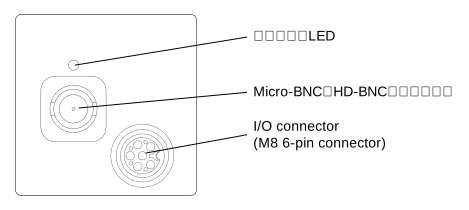
カメラを取り付けるには:
- 一般的なインストール手順に従ってください。
-
カメラをコンピューターと電源に接続します。
Power over CoaXPress(PoCXP)を使用している場合
- CoaXPressデータケーブルを使用して、カメラのMicro-BNC (HD-BNC)コネクタをインターフェースカードまたはフレームグラバーのMicro-BNCポートに接続します。
外部電源を使用している場合
- 上記のように、CoaXPressデータケーブルをカメラとインターフェースカードまたはフレームグラバーに接続します。
- 電源 I/O ケーブルをカメラの M8 6ピンコネクタに接続します。
注: ご自身でケーブルを作成する場合は、カメラモデルに関するトピックに詳述されているピンアサインに従ってください。カメラに関するトピックは、エリアスキャンおよびラインスキャンカメラセクションにあります。 - 電源 I/O ケーブルのオープンエンドを電源に接続します。
Basler Original Equipment製品の電源を使用できます。 - 電源を電源コンセントに差し込みます。
-
ホストコンピューターの電源を入れ、コンピューターを起動します。
カメラのステータスLEDは、さまざまな動作状態と接続状態を示します。各LEDは、正確に1つのCXP接続の状態を示します。
さまざまなLEDの状態と対応する色については、カメラモデルに関するトピックを参照してください。カメラに関するトピックは、エリアスキャンおよびラインスキャンカメラセクションにあります。
-
次のステップに進みます。
boost Rカメラ#
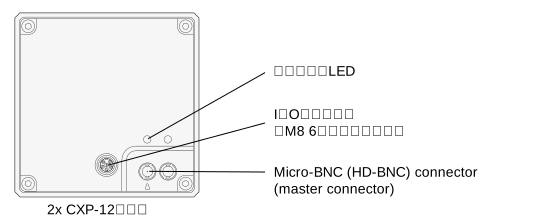
カメラを取り付けるには:
- 一般的なインストール手順に従ってください。
-
カメラをコンピューターと電源に接続します。
Power over CoaXPress(PoCXP)を使用している場合
- CoaXPressデータケーブルを使用して、カメラのMicro-BNC (HD-BNC)コネクタをインターフェースカードまたはフレームグラバーのMicro-BNCポートに接続します。注: CoaXPressデータケーブルを1本のみ使用する場合は、必ずカメラのマスターコネクタにケーブルを接続してください。
外部電源を使用している場合
- 上記のように、CoaXPressデータケーブルをカメラとインターフェースカードまたはフレームグラバーに接続します。
- 電源 I/O ケーブルをカメラの M8 6ピンコネクタに接続します。
注: ご自身でケーブルを作成する場合は、カメラモデルに関するトピックに詳述されているピンアサインに従ってください。カメラに関するトピックは、エリアスキャンおよびラインスキャンカメラセクションにあります。 - 電源 I/O ケーブルのオープンエンドを電源に接続します。
Basler Original Equipment製品の電源を使用できます。 - 電源を電源コンセントに差し込みます。
-
ホストコンピューターの電源を入れ、コンピューターを起動します。
カメラのステータスLEDは、さまざまな動作状態と接続状態を示します。各LEDは、正確に1つのCXP接続の状態を示します。
さまざまなLEDの状態と対応する色については、カメラモデルに関するトピックを参照してください。カメラに関するトピックは、エリアスキャンおよびラインスキャンカメラセクションにあります。
-
次のステップに進みます。
boost Vカメラ#
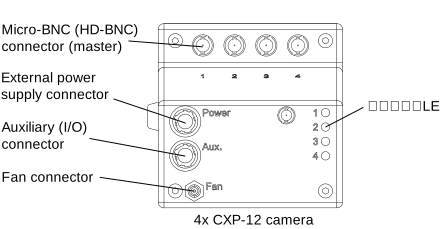
カメラを取り付けるには:
- 一般的なインストール手順に従ってください。
-
カメラをコンピューターと電源に接続します。
Power over CoaXPress(PoCXP)を使用している場合
- CoaXPressデータケーブルを使用して、カメラのMicro-BNC (HD-BNC)コネクタをインターフェースカードまたはフレームグラバーのMicro-BNCポートに接続します。
「1」とラベル付けされたコネクタは最後に接続する必要があります。
外部電源を使用している場合
- 上記のように、CoaXPressデータケーブルをカメラとインターフェースカードまたはフレームグラバーに接続します。
-
カメラの外部電源コネクタ(Hirose micro HR10A-7R-4S)に電源ケーブルを接続します。
メモ:自作のケーブルを使用する場合は、ご使用のカメラモデルのトピックに記載されているピン配置に従ってください。カメラのトピックは、エリアスカンおよびラインスカンカメラセクションにあります。情報
AUX電源による安定した電源供給を確保するため、フレームグラバーまたはインターフェイスカードの接続されているすべてのチャネルでPoCXPをオフにしてください。これを行うには、pylon Viewerでフレームグラバーまたはインターフェイスカードを開き、Transport Layer Controlに移動して、選択した各CXP接続に対してPoCxp Offコマンドを実行します。
-
電源ケーブルのもう一方の端を電源に接続します。
Basler純正アクセサリの電源を使用できます。 - 電源を電源コンセントに差し込みます。
- CoaXPressデータケーブルを使用して、カメラのMicro-BNC (HD-BNC)コネクタをインターフェースカードまたはフレームグラバーのMicro-BNCポートに接続します。
-
ホストコンピューターの電源を入れ、コンピューターを起動します。
カメラのステータスLEDは、さまざまな動作状態と接続状態を示します。各LEDは、正確に1つのCXP接続の状態を示します。
さまざまなLEDの状態と対応する色については、カメラモデルに関するトピックを参照してください。カメラに関するトピックは、エリアスキャンおよびラインスキャンカメラセクションにあります。
-
次のステップに進みます。
racer 2 Lカメラ#
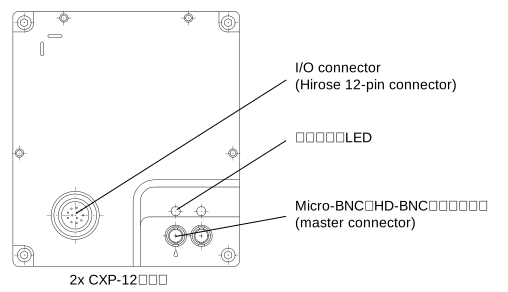
カメラを取り付けるには:
- 一般的なインストール手順に従ってください。
-
カメラをコンピューターと電源に接続します。
Power over CoaXPress(PoCXP)を使用している場合
- CoaXPressデータケーブルを使用して、カメラのMicro-BNC(HD-BNC)コネクタを、インターフェイスカードまたはフレームグラバーのMicro-BNCポートに接続します。
メモ:CoaXPressデータケーブルを1本のみ使用する場合は、必ずカメラのマスターコネクタにケーブルを接続してください。
外部電源を使用している場合
- 上記のように、CoaXPressデータケーブルをカメラとインターフェースカードまたはフレームグラバーに接続します。
- 電源I/Oケーブルをカメラの12ピンHirose microレセプタクルに接続します。
メモ:自作のケーブルを使用する場合は、ご使用のカメラモデルのトピックに記載されているピン配置に従ってください。カメラのトピックは、エリアスカンおよびラインスカンカメラセクションにあります。 - 電源 I/O ケーブルのオープンエンドを電源に接続します。
Basler Original Equipment製品の電源を使用できます。 - 電源を電源コンセントに差し込みます。
- CoaXPressデータケーブルを使用して、カメラのMicro-BNC(HD-BNC)コネクタを、インターフェイスカードまたはフレームグラバーのMicro-BNCポートに接続します。
-
ホストコンピューターの電源を入れ、コンピューターを起動します。
カメラのステータスLEDは、さまざまな動作状態と接続状態を示します。各LEDは、正確に1つのCXP接続の状態を示します。
さまざまなLEDの状態と対応する色については、カメラモデルに関するトピックを参照してください。カメラに関するトピックは、エリアスキャンおよびラインスキャンカメラセクションにあります。
-
次のステップに進みます。
racer 2 XL カメラ#
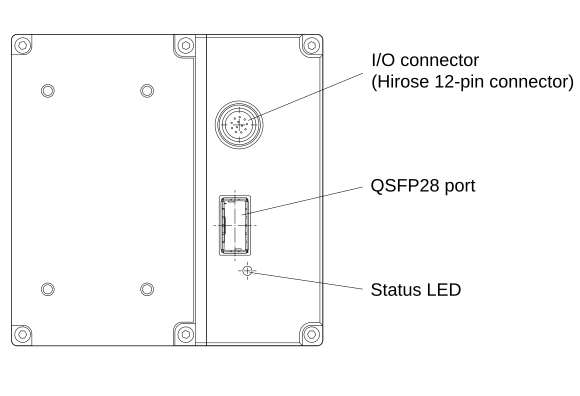
カメラを取り付けるには:
- 一般的なインストール手順に従ってください。
-
光ファイバーケーブルをQSFP28トランシーバーモジュールに差し込みます。
警告 – レーザーの安全性に関する指示
負傷を避けるため、常に次の安全に関する注意事項に従ってください。
光ファイバー接続では、赤外域のレーザー放射が放出されます。レーザー放射は目に見えず、直接目を露出させると目を損傷するおそれがあります。開いたファイバーの端やアクティブな光ポートを絶対に覗き込まないでください。取り付け、メンテナンス、または清掃を行う前に、必ず接続を切り離すか、安全にシャットダウンしてください。ファイバーの端材は慎重に廃棄してください。
-
カメラをコンピューターと電源に接続します。
- QSFP28トランシーバーモジュールを取り付けた光ファイバーケーブルを使用して、カメラのQSFP28ポートをフレームグラバーのQSFP28ポートに接続します。
- 電源I/Oケーブルをカメラの12ピンHirose microレセプタクルに接続します。
メモ:自作のケーブルを使用する場合は、ご使用のカメラモデルのトピックに記載されているピン配置に従ってください。カメラのトピックは、エリアスカンおよびラインスカンカメラセクションにあります。 - 電源I/Oケーブルのもう一方の端を電源に接続します。
Basler純正アクセサリのpower supply 24 V/60 W, DC Jack 5.5/2.1 mmを使用できます。 - 電源を電源コンセントに差し込みます。
-
ホストコンピューターの電源を入れ、コンピューターを起動します。
カメラのステータスLEDは、さまざまな動作状態と接続状態を示します。各LEDは、正確に1つのCXP接続の状態を示します。
さまざまなLEDの状態と対応する色については、カメラモデルに関するトピックを参照してください。カメラに関するトピックは、エリアスキャンおよびラインスキャンカメラセクションにあります。
-
次のステップに進みます。
次のステップ#
-
racer 2 S/Lカメラ:カメラとBaslerフレームグラバーまたはインターフェイスカードおよびソフトウェアのインストールについては、Configuring CXP Line Scan Cameras and Frame Grabbersセクションを参照してください。
-
racer 2 XLカメラ:カメラとimaFlex 2 Dual 100フレームグラバーおよびFramegrabber SDKのインストールについては、Configuring a CoaXPress-over-Fiber Systemセクションを参照してください。
-
その他のカメラ:pylon Viewerを使用して、カメラが検出されたかどうかを確認し、画像の取得や表示を行い、画質を向上させるためにパラメータ設定を調整します。