imaFlex 2 Dual 100#
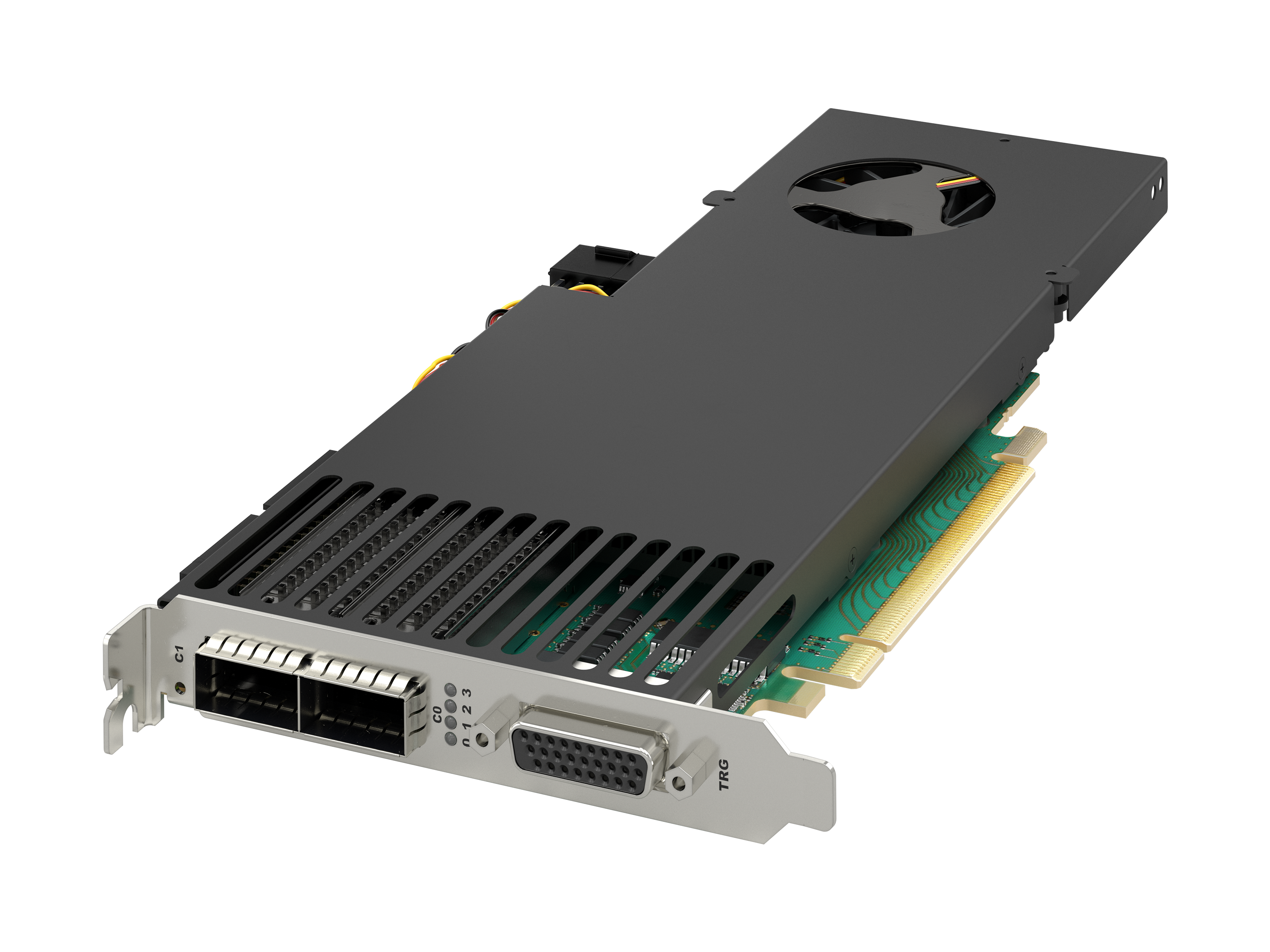
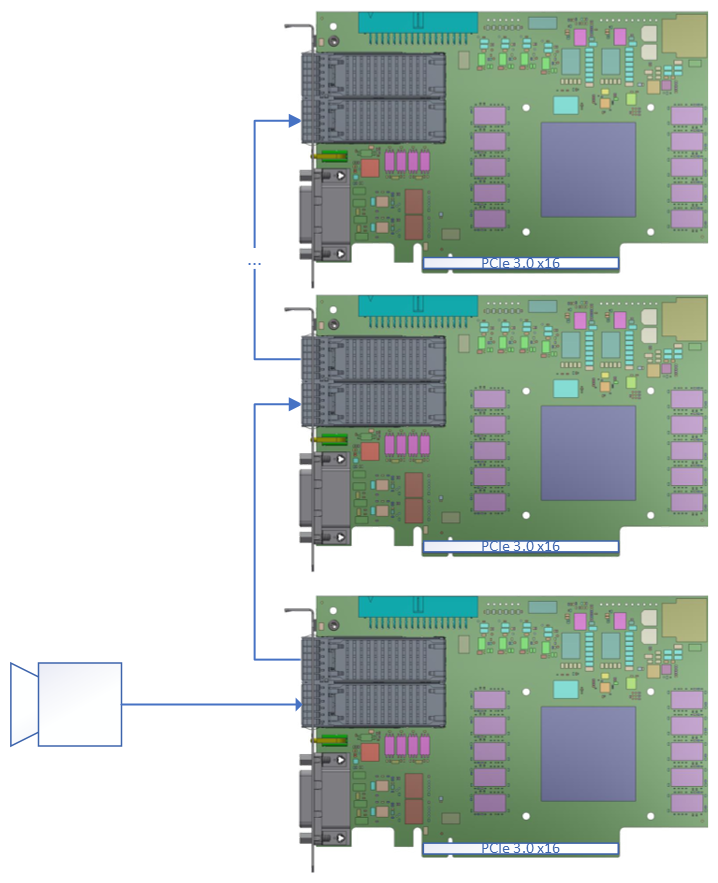
imaFlex 2 Dual 100 をホストコンピュータにインストールするには、PCIe Gen. 3.0 x16 スロット以上に差し込みます。次の図は、マスターフレームグラバーに 1 台のカメラを接続し、複数のスレーブフレームグラバーを接続したデータ転送シナリオにおける imaFlex 2 Dual 100 を示しています。
画像処理#
このフレームグラバーは VisualAppletsによって完全にプログラム可能です。特定のニーズに合わせて独自の画像処理アプリケーションを設計できます。Basler では、コンサルティングサポートや VisualApplets トレーニングを提供しているほか、お客様の特定のアプリケーションを Basler が実装することも可能です。
独自のアプレットの作成方法については、VisualApplets documentationを参照してください。
さらに、Basler は VisualApplets デザインとしてのデータ転送のサンプルと、C++ SDK 制御アプリケーションを提供しています。これらのサンプルでは、データ転送用のオペレーターの使用方法を確認できます。サンプルは VisualApplets 3.7.0 以降に付属しており、VisualApplets のインストールディレクトリの次の場所にあります: Examples/Acquisition/DataForwarding。詳細については、以下を参照してください。 data forwarding examples documentation.
生産ラインへの統合#
生産ラインへの統合のために、imaFlex 2 Dual 100には複数の汎用入出力(GPIO)が用意されています。フロントGPIOコネクタには16個のGPIOが、TTL Trigger boardやOpto-Coupled Trigger 5 boardなどのトリガー拡張ボードを介してさらに16個のGPIOが利用可能です。フロントGPIOはガルバニック絶縁されています。拡張トリガーボードにおけるガルバニック絶縁は、トリガーボードのハードウェアによって異なります。
imaFlex 2 Dual 100 のフロント GPI および GPO は、2 つの独立したグループ(合計 4 つ)に分割されています。各グループには 4 つの GPI または 4 つの GPO が含まれます。各グループは個別の電源レベルで動作させることができます。
これらの GPIO により、次のことが可能になります。
- トリガー信号(例:照明信号やカメラ信号)を送信して周辺機器を制御する。
- シャフトエンコーダーや光電センサーなどの周辺機器からさまざまなトリガー信号を受信できます。
- 複数のフレームグラバーを同期させる、および/または
- 接続されたデバイスを同期させます。
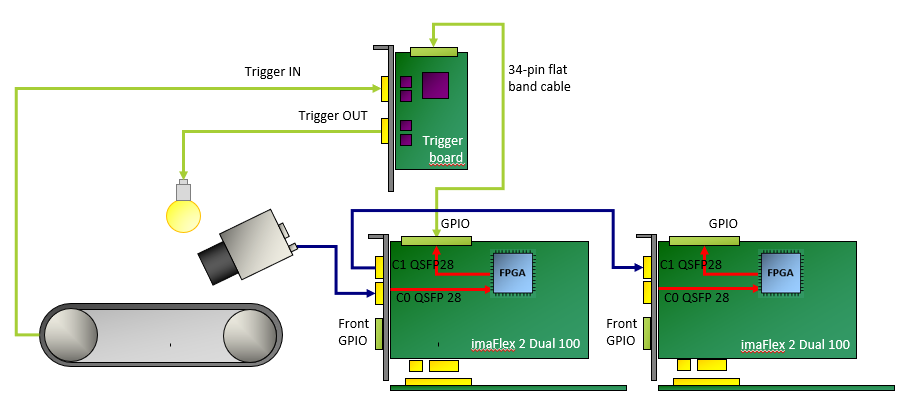
フロントGPIOインターフェースを介した接続の詳細については、GPIO Connectors (CoF Frame Grabbers)を参照してください。
ソフトウェアプログラミングおよび設定インターフェース#
imaFlex 2 Dual 100は、使いやすいAPIを提供します。Framegrabber APIを使用すると、フレームグラバーをあらゆる画像処理アプリケーションに統合できます。Framegrabber APIを使用して、C/C++でコードを書くことができます。
Framegrabber APIの詳細については、Framegrabber API documentationを参照してください。
コネクタとLED#
コネクター#
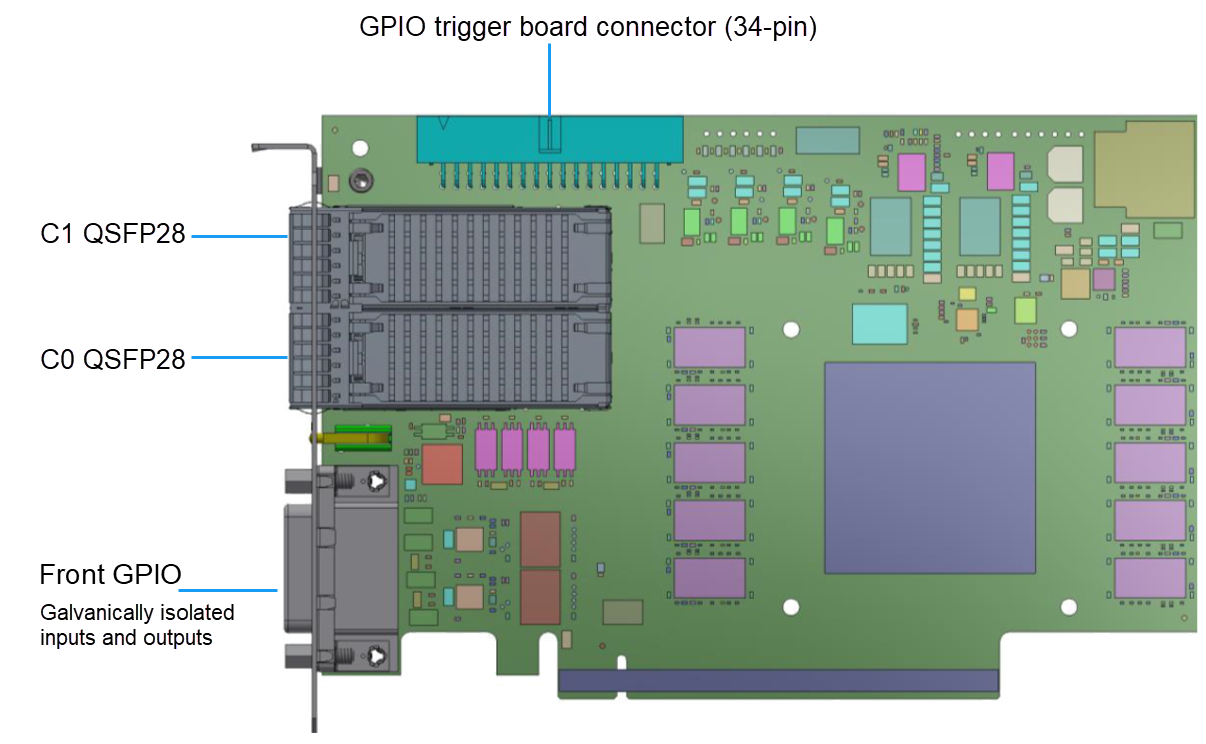
imaFlex 2 Dual 100には、以下のコネクターが搭載されています。
スロットブラケットのLED#
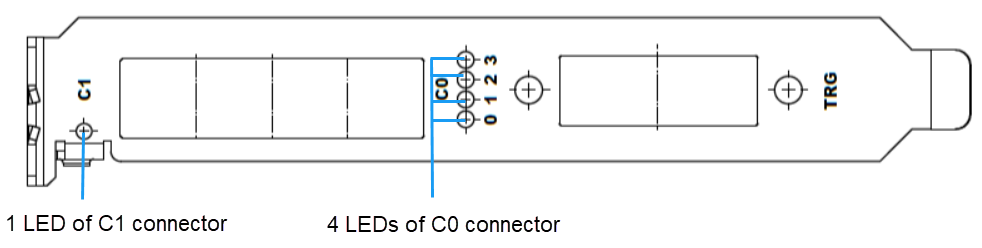
スロットブラケットには、QSFP28ファイバーレーン接続の状態を示す5つの2色LEDがあります。LEDの色が意味する内容は、使用するファイバープロトコルによって異なります。CoF(CoaXPress over fiber)の場合、LEDの点滅はCXP3.0規格で定義されています。一般的に、最も重要な2つの状態は次のとおりです:
 QSFP28コネクター(C1)/またはQSFP28コネクターC0での接続、およびレーンが動作可能な状態であること。
 接続が確立されていません。
スロットブラケット上のスペースが限られているため、C1コネクターにはLEDが1つだけあり、C0コネクターには各ファイバーレーン1に対して4つのLEDがあります。
データフォワーディング (DF) におけるLEDの状態はFPGAアプリケーションによって定義され、VisualAppletsデザイン内の DFLed operator を介して制御されます。
2色LEDは、緑、赤、オレンジの3色に対応しています。オレンジ色は、緑と赤の両方の状態が同時にオンになったときに発生します。
ボード上のLED#
imaFlex 2 Dual 100のボード上には、9つのLEDがあります。
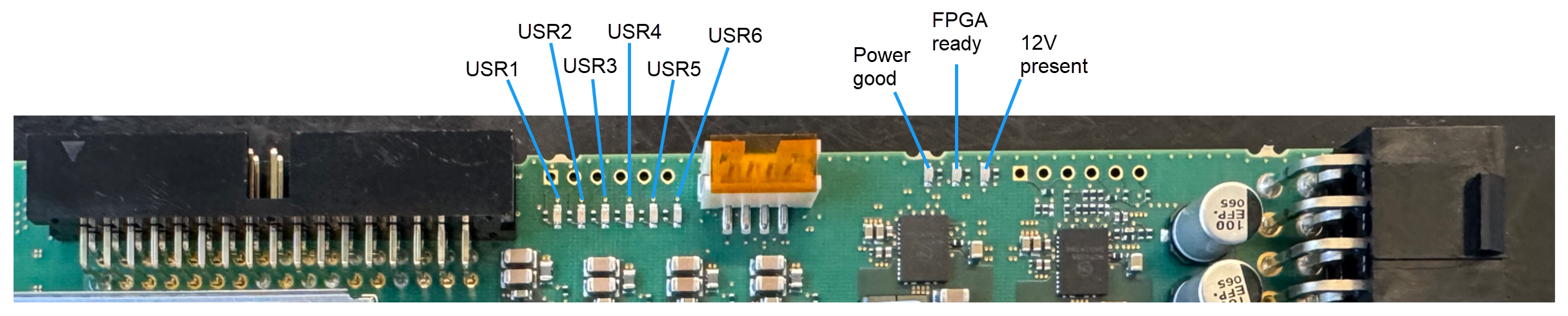
| LED名 | LEDの色 | 説明 |
|---|---|---|
| Power Good | 緑 | パワーシーケンスが完了し、電源が安定して正常な状態です。 |
| FPGA Ready | 緑 | FPGAは正常にコンフィグレーションされ、動作可能な状態です。 |
| 12 V Present | 緑 | 外部電源 12 V が供給されています。 |
| USR1~USR6 | 緑 | ユーザー定義LED。これらのLEDは、VisualAppletsデザイン内の LED operator を介して設定できます。 |
仕様#
仕様については、Baslerウェブサイトの imaFlex 2 Dual 100 を参照してください。
フロントGPIOコネクタ#
フロント GPIO コネクターは、フレームグラバーの基本的なトリガー設定をカバーしています。そのトリガーコネクターを使用すると、周辺機器(PLCなど)を制御できます。
ソケットはスロットブラケットに直接配置されています。
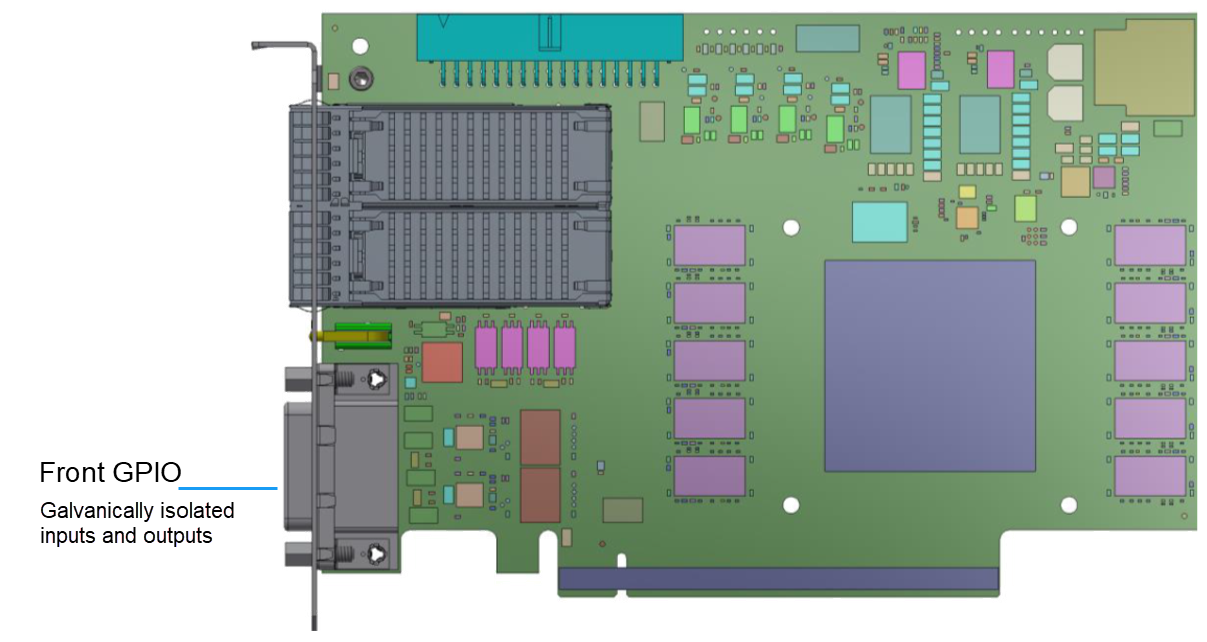
デフォルトのコンフィグレーションでは、フロント GPIO コネクターのトリガーは以下を提供します。
- プルアップモードの8つのシングルエンドガルバニック絶縁入力信号。
- 8つのシングルエンドガルバニック絶縁出力信号。
フロント GPIO コネクターのピン割り当てを設定して、以下のようなさまざまなタイプの入力信号を提供できます。
- プルアップの代わりにプルダウン
- 4つの差動信号
- 2つの差動信号と4つのシングルエンド信号
GPIO設定は、新しいアプレットのデザイン時の AppletProperties operatorのパラメータを介して、および/または、パラメータタイプが次のように設定されている場合はランタイムSDK内のAppletProperties operatorのパラメータを介して、VisualAppletsデザイン内で変更できます。 dynamic.
詳細については、Input Configuration を参照してください。
フロントGPIOコネクタのピンレイアウト#
情報
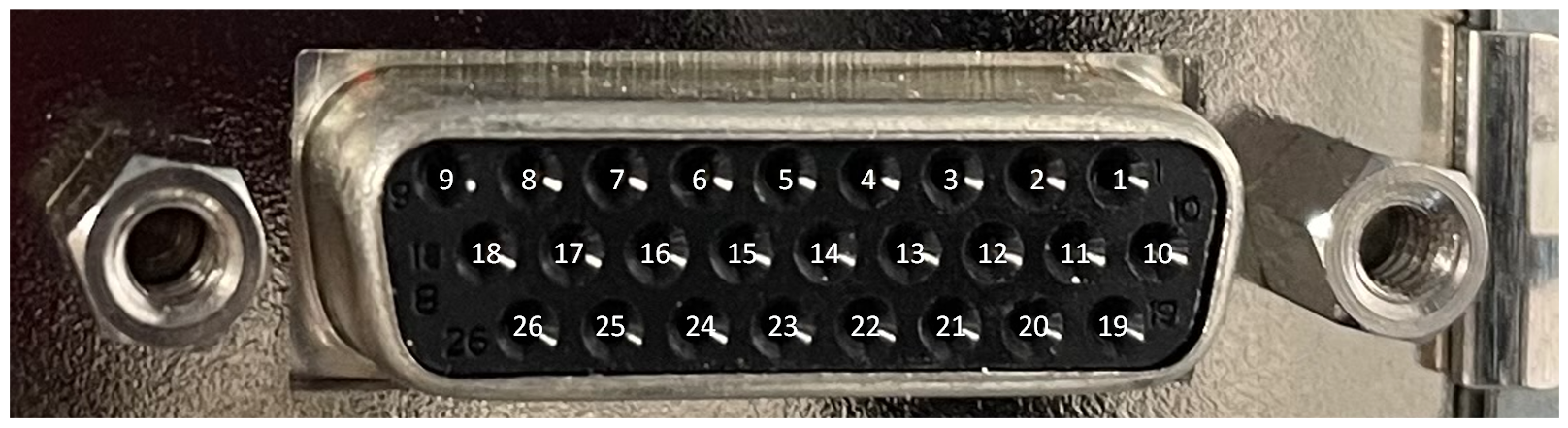
フロント GPIO コネクタは、メスの SUB-D 26 コネクタの形状で提供されます。これは一般的に使用されているコネクタタイプです。フレームグラバーのメスのフロント GPIO コネクタに接続するには、対応するオスのバージョンを使用してください。
| PIN番号 | 絶縁型 | Signal Type | 基準信号 |
|---|---|---|---|
| 1 | はい | FrontGpi6 | VccIn47 (ピン 19) / GndIn47 (ピン 20) |
| 2 | はい | FrontGpi7 | VccIn47 (ピン 19) / GndIn47 (ピン 20) |
| 3 | はい | FrontGpi2 | VccIn03 (ピン 21) / GndIn03 (ピン 22) |
| 4 | はい | FrontGpi3 | VccIn03 (ピン 21) / GndIn03 (ピン 22) |
| 5 | はい | FrontGpo6 | VccOut47 (ピン 23) / GndOut47 (ピン 24) |
| 6 | はい | FrontGpo7 | VccOut47 (ピン 23) / GndOut47 (ピン 24) |
| 7 | はい | FrontGpo2 | VccOut03 (ピン 25) / GndOut03 (ピン 26) |
| 8 | はい | FrontGpo3 | VccOut03 (ピン 25) / GndOut03 (ピン 26) |
| 9 | はい | 5VOutIso (絶縁型 5 V 出力、最大 500 mA) | GndOutIso (pin 18) |
| 10 | はい | FrontGpi4 | VccIn47 (ピン 19) / GndIn47 (ピン 20) |
| 11 | はい | FrontGpi5 | VccIn47 (ピン 19) / GndIn47 (ピン 20) |
| 12 | はい | FrontGpi0 | VccIn03 (ピン 21) / GndIn03 (ピン 22) |
| 13 | はい | FrontGpi1 | VccIn03 (ピン 21) / GndIn03 (ピン 22) |
| 14 | はい | FrontGpo4 | VccOut47 (ピン 23) / GndOut47 (ピン 24) |
| 15 | はい | FrontGpo5 | VccOut47 (ピン 23) / GndOut47 (ピン 24) |
| 16 | はい | FrontGpo0 | VccOut03 (ピン 25) / GndOut03 (ピン 26) |
| 17 | はい | FrontGpo1 | VccOut03 (ピン 25) / GndOut03 (ピン 26) |
| 18 | いいえ | GndOutIso (5VOutIso 用絶縁型グランド) | 5VOutIso (pin 9) |
| 19 | はい | VccIn47 (入力グループ 47 用絶縁型 VCC) | GndIn47 (pin 20) |
| 20 | はい | GndIn47 (入力グループ 47 用絶縁型グランド) | VccIn47 (ピン 19) |
| 21 | はい | VccIn03 (入力グループ 03 用絶縁型 VCC) | GndIn03 (ピン 22) |
| 22 | はい | GndIn03 (入力グループ 03 用絶縁型グランド) | VccIn03 (ピン 21) |
| 23 | はい | VccOut47 (出力グループ 47 用の絶縁 VCC) | GndOut47 (ピン 24) |
| 24 | はい | GndOut47 (出力グループ 47 用の絶縁グラウンド) | VccOut47 (ピン 23) |
| 25 | はい | VccOut03 (出力グループ 03 用の絶縁 VCC) | GndOut03 (ピン 26) |
| 26 | はい | GndOut03 (出力グループ 03 用の絶縁グラウンド) | VccOut03 (ピン 25) |
| シールド | いいえ | GND (非絶縁基板グランド / アース / ブラケット) |
情報
- VccIn03 および VccIn47 は最小 4.5 V から最大 26 V の間でなければならず、I max は 10.7 mA です。
- VccOut03 および VccOut47 は最小 4.5 V から最大 26 V の間でなければならず、I max は 172 mA です。
- 03 グループと 47 グループは互いに完全に独立しており、異なる電源から供給を受けることができます。
- 入力電源と出力電源は互いに完全に独立しており、異なる電源から供給を受けることができます。
- グループ内の外部信号ソースに独自の電源が必要な場合は、そこへ 5VOutIso / GndOutIso を供給し、その電源を対応する VccIn / GndIn グループピンにもフィードバックします。
- 外部信号ソースが独自の電源も提供している場合は、その電源を対応する VccIn / GndIn グループピンに供給します。この場合、5VOutIso および GndOutIso を対応する VccIn / GndIn グループピンに接続してはなりません。
- グループ内の外部信号シンクに独自の電源が必要な場合は、そこへ 5VOutIso / GndOutIso を供給し、その電源を対応する VccOut / GndOut グループピンにもフィードバックします。
- グループ内の外部信号シンクが独自の電源を提供している場合は、その電源を対応する VccOut / GndOut グループピンに供給します。この場合、5VOutIso および GndOutIso を対応する VccOut / GndOut グループピンに接続してはなりません。
- すべての入力は、03(0 ~ 3 の GPI)と 47(4 ~ 7 の GPI)の 2 つの独立した入力グループに分かれています。各グループには専用の電源ピンがあります。
- すべての出力は、03(0 ~ 3 の GPO)と 47(4 ~ 7 の GPO)の 2 つの独立した出力グループに分かれています。各グループには専用の電源ピンがあります。
- VccIn / GndIn ピンが未接続のままの場合、対応するグループ内のすべての FrontGpi ピンは機能しません。
- VccOut / GndOut ピンが未接続のままの場合、対応するグループ内のすべての FrontGpo ピンは機能しません。
可能なトポロジ#
imaFlex 2 Dual 100 フレームグラバーは、カメラとフレームグラバーを接続するさまざまなトポロジで動作させることができます。これらのトポロジの中には、imaFlex 2 Dual 100 でサポートされているデータ転送(データフォワーディング)が含まれるものもあります。フレームグラバーでのデータ転送の設定方法の詳細については、VisualApplets User Manualを参照してください。
ベースライン・トポロジー#
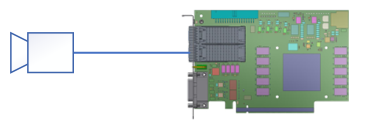
ベースライン トポロジでは、フレームグラバーが前処理(または完全な処理)を実行し、結果の帯域幅を約 13 GB/s に削減します。これは、PCIe Gen3 x16 インターフェイスを介してターゲットの CPU / GPU にデータを転送するために必要です。
デイジーチェーン・トポロジー#

デイジーチェーン トポロジでは、カメラがマスター フレームグラバーに接続されます。マスター フレームグラバーは次のスレーブ フレームグラバーに接続します。スレーブ フレームグラバーはさらに次のスレーブ フレームグラバーに接続します。チェーンは、処理要件を満たすために必要な長さにすることができます。このトポロジでは、各フレームグラバーは通常、追加の GPU をホストしていることが多い個別の PC に配置されるため、処理は CPU と GPU のクラスターで行われます。フレームグラバー上での処理も可能です。フレームグラバーは両方向にデータを交換することもできます。
デュアルカメラ・トポロジー#
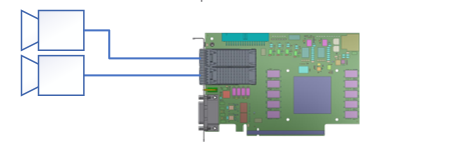
デュアルカメラ トポロジでは、2台の 100 Gbit/s カメラが 1 台のフレームグラバーに接続されます。このトポロジは、以下のアプリケーションに最適です。
- カメラは最大帯域幅で動作していません。
- フレームグラバーでの前処理は、RAM にデータを保存する前に実行され、帯域幅を削減し、両方のカメラストリームを 2 つの Memory インターフェイスにバッファリングします。
これらの場合、フレームグラバーは、VisualApplets で作成されたデザイン内で前処理を実行し、結果の帯域幅を削減して、約 13 GByte/s という制限された PCIe 伝送帯域幅に適合させる必要があります。
デュアルマスター・トポロジー#
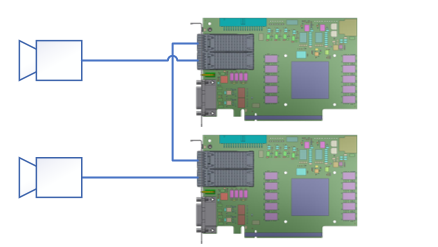
デュアルマスター トポロジでは、各カメラが専用のフレームグラバーに接続します。両方のフレームグラバーは、残りの QSFP28 コネクタを使用して相互に接続します。フレームグラバーは、複雑なコンピューティングシナリオや同期のために、通信チャネルとして、かつ/または 100 Gbit/s 接続を介して両方向でデータを交換するためにそのポートを使用しています。
トリプルマスター・トポロジー#
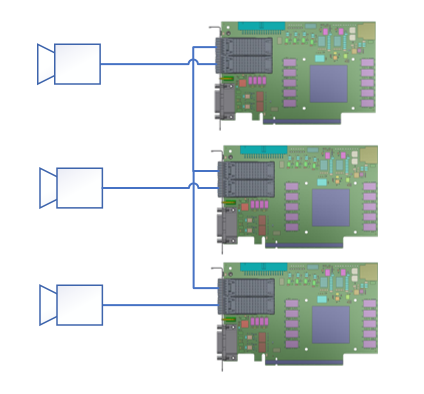
トリプルマスター トポロジでは、すべてのフレームグラバーが専用のカメラに接続し、中央のフレームグラバーは、4 つの QSFP28 レーンを 2 つのレーンのみを伝送する 2 つの QSFP28 モジュールに分割する特殊なファイバーケーブルを介して、残りの QSFP28 ポートで他の 2 台のフレームグラバーに接続します。2 台のフレームグラバー間の通信は、2 つのレーンしか使用できないため、最大 50 Gbit/s で動作します。各カメラは最大 100 Gbit/s で動作しています。
取得アプレット#
システムリソースを最適に活用するため、imaFlex 2 Dual 100向けに設計されたすべての画像取得および処理機能が、同時にimaFlex 2 Dual 100にロードされるわけではありません。
その代わりに、Baslerでは特定のアプリケーション分野の要件を満たすように組み合わせられた、特定の画像取得および処理機能のさまざまなコンパイルを提供しています。
通常、アプレットは特定のカメラインターフェース規格とトポロジ、特定の画像取得機能、および場合によっては特定の画像(前)処理機能をサポートします。
アプレットには、常にBaslerから提供される取得アプレット(Acquisition Applets)(*.dll)と、ユーザー自身またはBaslerによって VisualApplets で開発されたカスタムアプレット(*.hap)の2種類があります。
- 提供される取得アプレット(Acquisition Applets)の詳細については、Acquisition Applets for imaFlex 2 Dual 100を参照してください。
- 提供される取得アプレット(GenTLおよびFglib)のPDFドキュメントについては、Applets for imaFlex 2 Dual 100 Documentationを参照してください。
- 標準付属の取得アプレット(Acquisition Applets)に加え、imaFlex 2 Dual 100は、特定のアプリケーションで必要とされる高度に特化した画像処理タスクを実行できるようにプログラミングすることができます。プログラミングは、Basler、認定パートナー、または使いやすいグラフィカルなFPGAプログラミング環境であるVisualAppletsを使用してユーザー自身で行うことができます。
注意事項#
→ Safety Instructions (Frame Grabbers)を参照してください。
インストール#
→ Connecting Frame Grabbersを参照してください。
→ Connecting Camerasを参照してください。