デュアルROI#
これらの領域からのピクセルデータのみが転送されます。これにより、カメラのフレームレートが増加します。
この機能は、Basler boost Vカメラモデルでのみ使用できます。
機能を使用する#
仕組み#
Dual ROI機能を使用すると、センサーアレイ上の垂直方向の2つの領域を定義できます。
画像を取得すると、領域内のピクセル情報のみがセンサーから読み取られ、単一の画像として送信されます。
- 高さと垂直オフセットは、両方の領域で個別に定義できます。これを行うには、センサーアレイ上の行を設定します。
- イメージ 幅 および 水平オフセット は常に両方の領域で同一です。これらはグローバルな
OffsetXおよびWidthパラメータ。
以下の例では、2つの行が定義されています。これにより、2つの領域が作成されます。
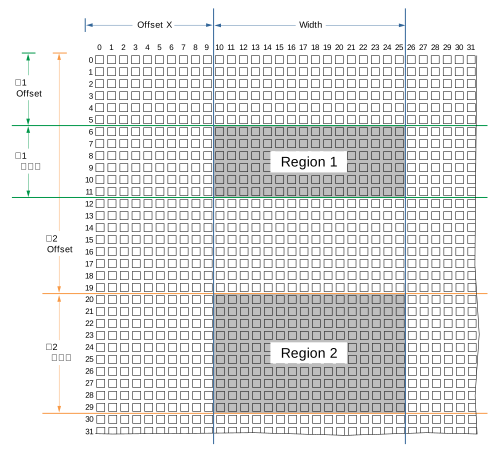
領域1および領域2内のピクセル情報は、単一の画像として転送されます。
リージョンの設定#
領域を設定するには:
- カメラがアイドル状態であること、つまり画像をキャプチャしていないことを確認します。
- パラメーターを
BslDualROIRowsEnableパラメータをtrue. - パラメーターを
BslDualROIRowSelectorパラメータをRow1. - パラメーターを
BslDualROIRowOffsetパラメータを行の希望する垂直オフセット(例:100)に設定します。 - パラメーターを
BslDualROIRowSizeパラメータを行の希望する高さ(例:50)に設定します。 - の値が
BslDualROIImageValidパラメータがtrueであることを確認します。そうでない場合は、パラメータ設定を変更してください。
たとえば、領域が重なってはならず、すべての領域の総高さがイメージセンサーの高さを超えてはなりません。 - 行2についても上記の手順を繰り返します。
- パラメーターを
OffsetXパラメータを両方の領域の希望する水平オフセットに設定します。 - パラメーターを
Widthパラメータを両方の領域の希望する幅に設定します。
Dual ROI機能を使用する際の注意事項#
-
If the
BslDualROIRowsEnableパラメータが次のように設定されていること:trueでは、画像取得が開始されるたびに、次のパラメータが自動的に設定されます。OffsetY:パラメータは行1の垂直オフセットに設定されます。Height:パラメータは、すべての領域の総高さ、つまりDual ROI機能によって作成された画像の高さに設定されます。
Dual ROI機能の使用中にこれらのパラメータを変更することは可能ですが、効果はありません。
-
Auto Function ROIの位置とサイズは、Dual ROI機能の出力に自動的に適応しません。自動機能を使用している場合は、Dual ROI領域がAuto Function ROIに含まれていることを確認してください。
サンプルコード#
// ** In this example, we define two regions in vertical direction
// that will be transmitted as a single image. **
// Enable the Dual ROI feature
camera.BslDualROIRowsEnable.SetValue(true);
// Select row 1
camera.BslDualROIRowSelector.SetValue(BslDualROIRowSelector_Row1);
// The first region should have a vertical offset of 100 and a height of 300 pixels
camera.BslDualROIRowOffset.SetValue(100);
camera.BslDualROIRowSize.SetValue(300);
// Select row 2
camera.BslDualROIRowSelector.SetValue(BslDualROIRowSelector_Row1);
// The second region should have a vertical offset of 500 and a height of 400 pixels
camera.BslDualROIRowOffset.SetValue(500);
camera.BslDualROIRowSize.SetValue(400);
// Check whether the outgoing image is valid
bool heightValid = camera.BslDualROIImageValid.GetValue();
// Both regions should have a horizontal offset of 200 and a width of 500
camera.OffsetX.SetValue(200);
camera.Width.SetValue(500);
INodeMap& nodemap = camera.GetNodeMap();
// ** In this example, we define two regions in vertical direction
// that will be transmitted as a single image. **
// Enable the Dual ROI feature
CBooleanParameter(nodemap, "BslDualROIRowsEnable").SetValue(true);
// Select row 1
CEnumParameter(nodemap, "BslDualROIRowSelector").SetValue("Row1");
// The first region should have a vertical offset of 100 and a height of 300 pixels
CIntegerParameter(nodemap, "BslDualROIRowOffset").SetValue(100);
CIntegerParameter(nodemap, "BslDualROIRowSize").SetValue(300);
// Select row 2
CEnumParameter(nodemap, "BslDualROIRowSelector").SetValue("Row1");
// The second region should have a vertical offset of 500 and a height of 400 pixels
CIntegerParameter(nodemap, "BslDualROIRowOffset").SetValue(500);
CIntegerParameter(nodemap, "BslDualROIRowSize").SetValue(400);
// Check whether the outgoing image is valid
bool heightValid = CBooleanParameter(nodemap, "BslDualROIImageValid").GetValue();
// Both regions should have a horizontal offset of 200 and a width of 500
CIntegerParameter(nodemap, "OffsetX").SetValue(200);
CIntegerParameter(nodemap, "Width").SetValue(500);
// ** In this example, we define two regions in vertical direction
// that will be transmitted as a single image. **
// Enable the Dual ROI feature
camera.Parameters[PLCamera.BslDualROIRowsEnable].SetValue(true);
// Select row 1
camera.Parameters[PLCamera.BslDualROIRowSelector].SetValue(PLCamera.BslDualROIRowSelector.Row1);
// The first region should have a vertical offset of 100 and a height of 300 pixels
camera.Parameters[PLCamera.BslDualROIRowOffset].SetValue(100);
camera.Parameters[PLCamera.BslDualROIRowSize].SetValue(300);
// Select row 2
camera.Parameters[PLCamera.BslDualROIRowSelector].SetValue(PLCamera.BslDualROIRowSelector.Row1);
// The second region should have a vertical offset of 500 and a height of 400 pixels
camera.Parameters[PLCamera.BslDualROIRowOffset].SetValue(500);
camera.Parameters[PLCamera.BslDualROIRowSize].SetValue(400);
// Check whether the outgoing image is valid
bool heightValid = camera.Parameters[PLCamera.BslDualROIImageValid].GetValue();
// Both regions should have a horizontal offset of 200 and a width of 500
camera.Parameters[PLCamera.OffsetX].SetValue(200);
camera.Parameters[PLCamera.Width].SetValue(500);
/* Macro to check for errors */
#define CHECK(errc) if (GENAPI_E_OK != errc) printErrorAndExit(errc)
GENAPIC_RESULT errRes = GENAPI_E_OK;  /* Return value of pylon methods */
_Bool heightValid = false;
/* ** In this example, we define two regions in vertical direction */
/* that will be transmitted as a single image. ** */
/* Enable the Dual ROI feature */
errRes = PylonDeviceSetBooleanFeature(hdev, "BslDualROIRowsEnable", 1);
CHECK(errRes);
/* Select row 1 */
errRes = PylonDeviceFeatureFromString(hdev, "BslDualROIRowSelector", "Row1");
CHECK(errRes);
/* The first region should have a vertical offset of 100 and a height of 300 pixels */
errRes = PylonDeviceSetIntegerFeature(hdev, "BslDualROIRowOffset", 100);
CHECK(errRes);
errRes = PylonDeviceSetIntegerFeature(hdev, "BslDualROIRowSize", 300);
CHECK(errRes);
/* Select row 2 */
errRes = PylonDeviceFeatureFromString(hdev, "BslDualROIRowSelector", "Row1");
CHECK(errRes);
/* The second region should have a vertical offset of 500 and a height of 400 pixels */
errRes = PylonDeviceSetIntegerFeature(hdev, "BslDualROIRowOffset", 500);
CHECK(errRes);
errRes = PylonDeviceSetIntegerFeature(hdev, "BslDualROIRowSize", 400);
CHECK(errRes);
/* Check whether the outgoing image is valid */
errRes = PylonDeviceGetBooleanFeature(hdev, "BslDualROIImageValid", &heightValid);
CHECK(errRes);
/* Both regions should have a horizontal offset of 200 and a width of 500 */
errRes = PylonDeviceSetIntegerFeature(hdev, "OffsetX", 200);
CHECK(errRes);
errRes = PylonDeviceSetIntegerFeature(hdev, "Width", 500);
CHECK(errRes);
# ** In this example, we define two regions in vertical direction
# that will be transmitted as a single image. **
# Enable the Dual ROI feature
camera.BslDualROIRowsEnable.Value = True
# Select row 1
camera.BslDualROIRowSelector.Value = "Row1"
# The first region should have a vertical offset of 100 and a height of 300 pixels
camera.BslDualROIRowOffset.Value = 100
camera.BslDualROIRowSize.Value = 300
# Select row 2
camera.BslDualROIRowSelector.Value = "Row1"
# The second region should have a vertical offset of 500 and a height of 400 pixels
camera.BslDualROIRowOffset.Value = 500
camera.BslDualROIRowSize.Value = 400
# Check whether the outgoing image is valid
heightValid = camera.BslDualROIImageValid.Value
# Both regions should have a horizontal offset of 200 and a width of 500
camera.OffsetX.Value = 200
camera.Width.Value = 500
pylon Viewerを使用して、パラメーターを簡単に設定することもできます。