画像取得とI/O制御#
input lineを使用すると、カメラを制御できます。例えば、特定の時点で画像キャプチャーをトリガーできます。output lineを使用すると、例えば、画像キャプチャーの進行中などに、カメラに関する情報を取得できます。
情報
このトピックのすべての情報は、すべてのblazeおよびSmart blazeカメラモデルに適用されます。簡潔にするため、すべてのモデルを指して「blaze」を使用しています。
光結合I/Oライン#
blaze カメラには、1 つのフォトカプラ絶縁入力Line Source と 1 つのフォトカプラ絶縁出力Line Source が用意されています。
Line0は、カメラの入力Line Source として事前に設定されています。Line1は、カメラの出力Line Source として事前に設定されています。
I/Oラインのラインモードは変更できません。
Opto-Coupled Input Line#
次の図では、光結合入力ラインを使用した一般的な回路を示します。
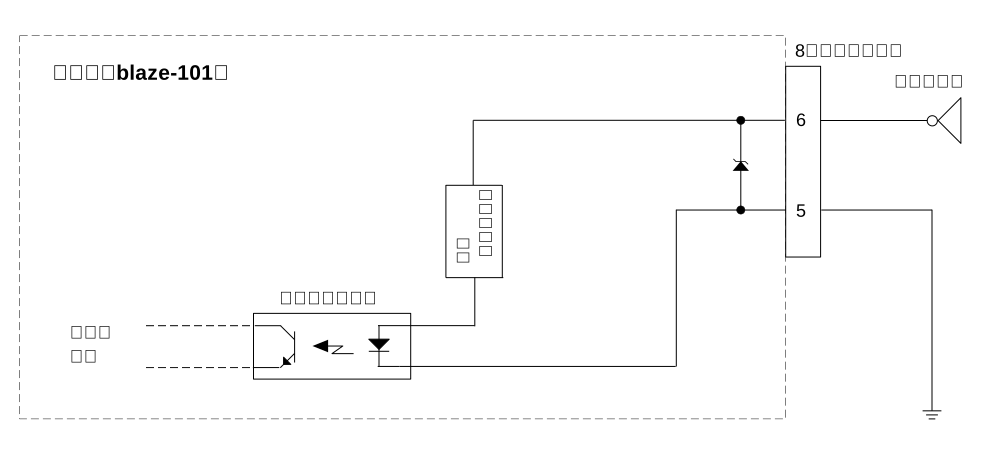
入力ラインはピン6に接続されます。ピン5は接地されます。
Opto-Coupled Output Line#
次の図では、光結合出力ラインを使用した一般的な回路を示します。
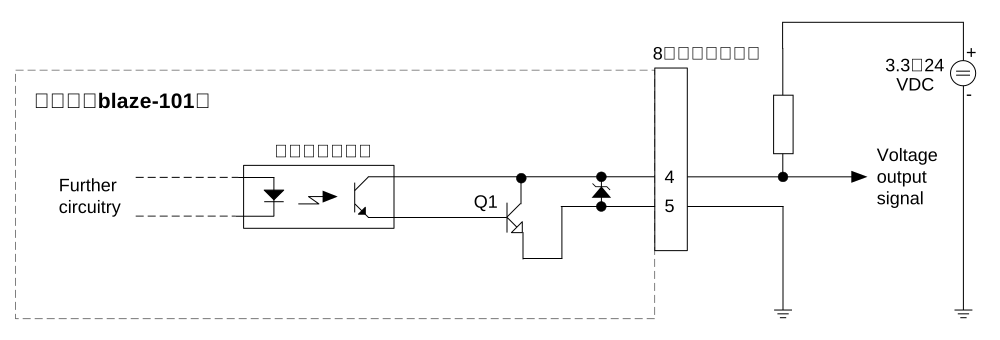
出力ラインはピン4に接続されます。ピン5は接地されます。
電気的要件#
入力ライン#
| 電圧 | 説明 |
|---|---|
| 30 VDC | 絶対最大電圧。 この電圧を超えてはなりません。カメラが破損し、保証が無効になる場合があります。 |
| DC 0~24V | 安全な動作範囲 |
| 0~1.0 VDC | 論理0 |
| >2.2 VDC | 論理1 |
- 最小電流:5mA
- 標準電流:5-15mA
応答時間#
- Typical response time (trigger to FrameActive): <300 µs
- 最大応答時間(FrameActiveへのトリガー):500µs
信号のデバウンスは実装されていません。したがって、入力ラインの電気信号がクリーンであることを確認する必要があります(例えば、PLC出力を使用するか、ローパスフィルターを適用します)。
出力ライン#
| 電圧 | 説明 |
|---|---|
| 30 VDC | 絶対最大電圧 |
| DC 3.3~24V | 安全な動作範囲 |
- 最大電流:50mA
- Leakage current: <60 µA
I/Oケーブル#
BaslerではPower-I/OケーブルM12、M、8P/Openの使用をお勧めしています。ケーブルのドキュメントには、I/Oラインのピン配置と色分けが含まれています。
機能と構成#
イメージ DigitalIOControl 機能カテゴリには、I/O ラインの動作を設定および監視するためのさまざまな機能が含まれています。
Line Selector#
Line Selector 機能を使用すると、設定する I/O ラインを選択できます。ラインを選択するには、 LineSelector パラメータを目的の I/O ライン(Line1 など)に設定します。
Line Status#
I/Oラインのステータスを確認するには、次の手順に従います。
- パラメーターを
LineSelectorパラメータをLine0(入力ラインの場合)またはLine1(出力ラインの場合)。 - 次の値を取得します。
LineStatusパラメータ。
値 false (0)は、ポーリング時に Line Status が Low であったことを意味します。値 true (1)は、ポーリング時に Line Status が High であったことを意味します。
Line Logic#
I/Oラインのロジックを決定するには、次の手順に従います。
- パラメーターを
LineSelectorパラメータをLine0(入力ラインの場合)またはLine1(出力ラインの場合)。 - 次の値を取得します。
LineLogicパラメータ。
このパラメーターは読み取り専用です。
Line Source(出力ラインのみ)#
出力ライン Line1 は、経由でさまざまな信号を提供するように設定できます。 LineSource パラメータを使用します。これにより、カメラのステータスを監視したり、外部デバイスを制御したりすることができます。
ラインソースを設定するには:
- パラメーターを
LineSelectorパラメータをLine1. - パラメーターを
LineSourceパラメーターを次のいずれかの値に設定します。Off: ラインは常にLowです。UserOutput0: Line Source は以下の値に設定されます:UserOutputValueパラメータ:UserOutput0.FrameActive: 信号は High 状態になります (カメラが深度マップに必要なすべてのサブフレームの取得を行っている間)。FrameTriggerWait: 信号は High 状態になります (カメラに対応するトリガータイプのトリガー信号を受信する準備が整ったとき)。
ネットワーク接続が不安定になった状況に対処するために、 FrameActive 信号を使用して、カメラが現在露光中かどうかを監視できます。最初のサブフレームの画像取得が開始されると信号が High になり、最後のサブフレームの取得が終了すると Low になります。これにより、 FrameActive 信号を使用して、複数のカメラや外部デバイスを同期させることもできます。
さらに、 FrameTriggerWait 信号を使用して、フラッシュを使用する場合にそのトリガーに最適なタイミングを見つけることができます。
次の図は、タイミングを示しています。
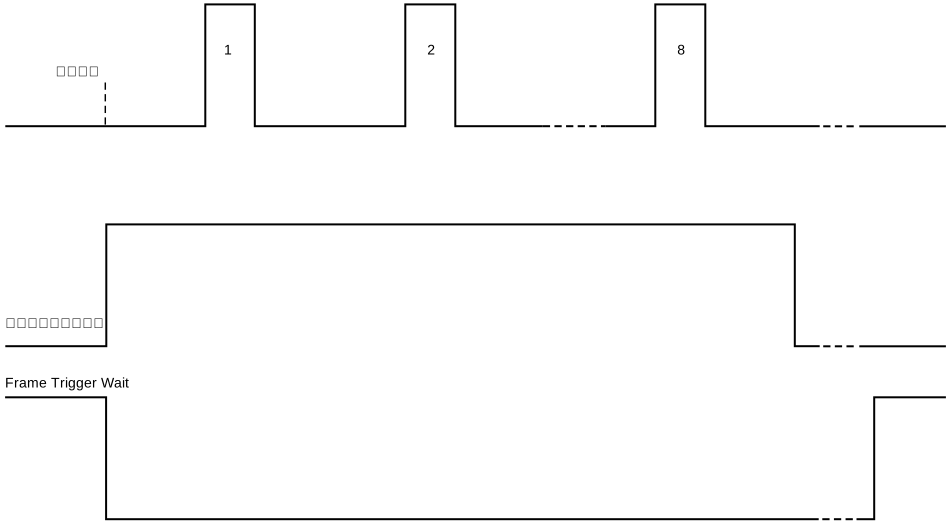
例: コンベアベルト上の検査対象オブジェクトがカメラの視野内に移動した場合、モーションアーティファクトを回避するため、 FrameActive 信号が High の間はコンベアベルトを動かさないようにする必要があります。
マルチカメラ操作の詳細と代替方法については、「複数のカメラの操作」を参照してください。
Line Inverter#
イメージ LineInverter パラメータは、I/Oラインの電気信号レベル(つまり、その 回線状況 HighからLow、またはその逆への反転)を反転させます。
ラインインバータを有効にするには:
- パラメーターを
LineSelectorパラメータを目的のI/Oラインに設定します。 - パラメーターを
LineInverterパラメータをtrue選択したI/Oラインの電気信号レベルを反転させるか、またはfalse反転を無効にします。
例: 入力ラインが Line0 トリガー入力ソースとして設定されている場合、信号レベルを反転させると、トリガーは立ち上がりエッジではなく、トリガー信号の立ち下がりエッジで発生します。
出力ライン Line1では、選択した出力信号のレベルが反転します。
User Output#
イメージ UserOutput パラメータを使用すると、出力Line Source のステータスを手動で制御できます。利用できるユーザー出力は 1 つのみです。
ユーザー出力ステータスを設定するには:
- パラメーターを
LineSelectorパラメータをLine1. - パラメーターを
LineSourceパラメータをUserOutput0. - パラメーターを
UserOutputSelectorパラメータをUserOutput0. - パラメーターを
UserOutputValueパラメーターを目的の値に設定するには:true: Line Status が High (1) です。false: Line Status が Low (0) です。
パラメータの変更は、 UserOutputValue 出力Line Source に即座に反映されます。
フリーランとトリガー操作#
カメラはfree runおよびtriggered modeで操作できます。
free runでは、カメラは、設定されたフレームレート(デフォルト値または[AcquisitionFrameRate]パラメーターで指定された値)に従って内部的にトリガーされます。
[free run]モード中は、Precision Time ProtocolおよびSynchronous Free Runの機能を使用して、複数のカメラのトリガーを同期できます。
では、 トリガーモードでは、外部トリガーソースを使用してカメラをトリガーします(例: ソフトウェアトリガー 経由、または ハードウェアトリガー 経由(入力ライン Line0を使用します。
を使用))。 FrameTriggerトリガーは常に
フリーラン画像取得#
フリーランの画像取得を有効にするには:
- パラメーターを
TriggerSelectorパラメータをFrameStart. - パラメーターを
TriggerModeパラメータをOff.
トリガー画像取得#
情報
カメラが再びトリガーを受け入れる準備が整うまで、新しいトリガー信号は無視されます。2 つのトリガー信号間の最小時間は、カメラのOperating Mode (最大許容フレームレート)、I/O 信号の特性、および I/O 信号の処理に必要な処理時間によって異なります。 FrameTriggerWait 信号を使用して、カメラがトリガー信号を受信する準備がいつ整うかを確認できます。
カメラがオーバートリガーを検出すると、 LastError パラメータに次が表示されます: エラーコード 1.
ヒント
トリガー画像取得を使用する場合、Trigger Thermal Drift Stabilizationを有効にすることで、測定精度を維持できます。この機能により、カメラはバックグラウンドで画像の取得を継続し、トリガーイベント間の温度変動を防ぐことで、一貫した正確な結果を確保します。
ソフトウェアトリガー#
ソフトウェアトリガーを介した画像取得を有効にするには:
- パラメーターを
TriggerSelectorパラメータをFrameStart. - パラメーターを
TriggerSourceパラメータをSoftware. - パラメーターを
TriggerModeパラメータをOn. - 次を使用して単一のフレームをトリガーします。
TriggerSoftware.
単一のデプスマップが取得、処理され、クライアントソフトウェアに送信されるようになりました。
ソフトウェアが画像を受信するようにトリガーする前に、取得が開始されていることを確認してください。
ハードウェアトリガー#
ハードウェアトリガーを介した画像取得を有効にするには:
- パラメーターを
TriggerSelectorパラメータをFrameStart. - パラメーターを
TriggerSourceパラメータをLine0. - パラメーターを
TriggerModeパラメータをOn.
画像は、次の立ち上がりエッジでトリガーされます。Line0(もしLineInverterパラメータが次のように設定されていること:false) または立ち下がりエッジ (もしLineInverterパラメータがtrueの場合)。画像は、カメラによって取得および処理された後、ホストコンピュータに送信されます。
ハードウェアが画像の受信をトリガーする前に、取得が開始されていることを確認してください。