dmA2448-23gm#
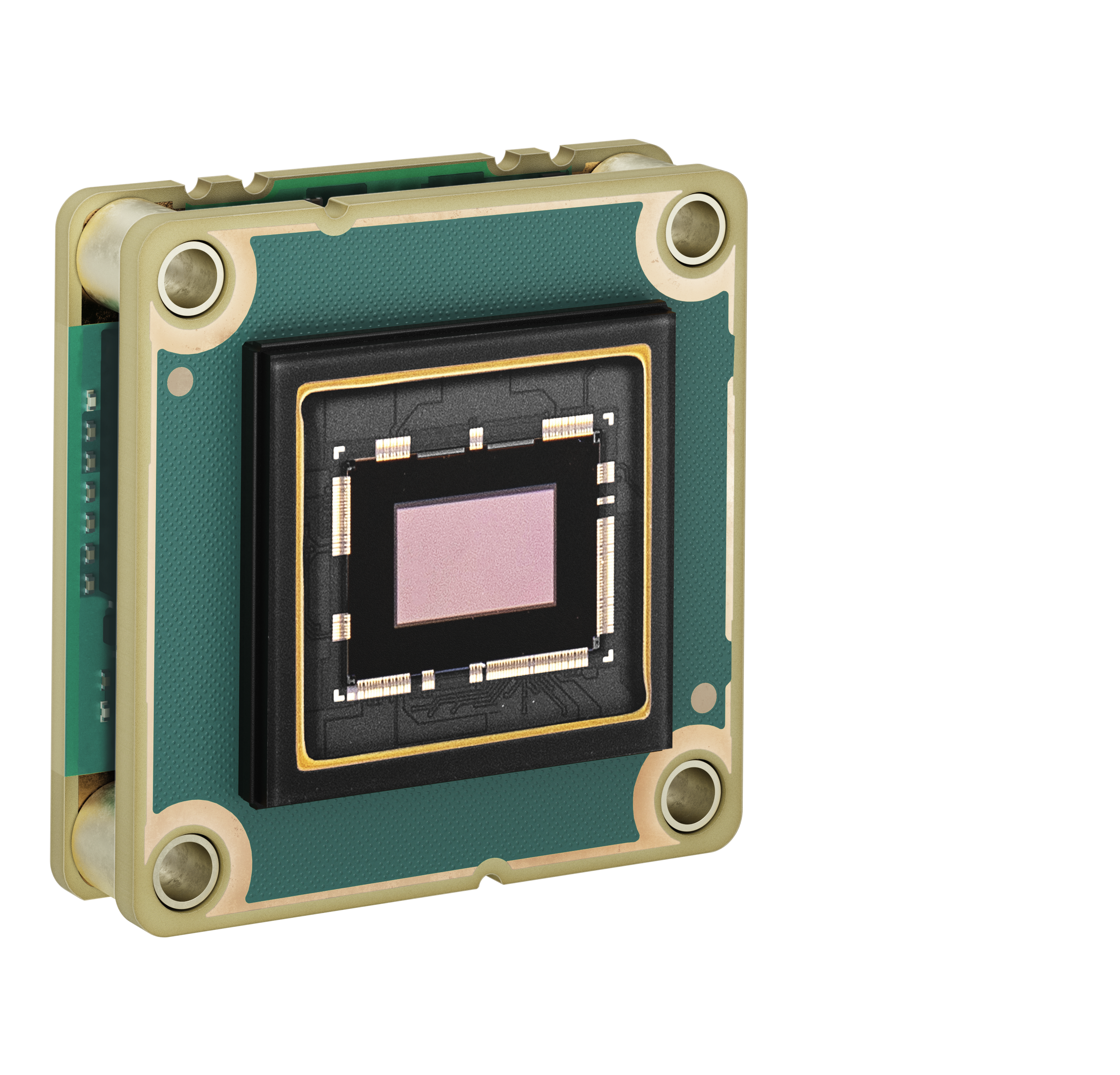
仕様#
一般仕様#
| dmA2448-23gm | |
|---|---|
| 解像度(横 x 縦ピクセル) | 2472 x 2064(フル解像度) 2448 x 2048(デフォルト解像度) |
| 解像度 | 5MP |
| センサータイプ | Sony IMX547-AAMJ-C ProgressiveスキャンCMOS Globalシャッター |
| センサーの形式 | 1/1.8インチ |
| センサーの有効対角長 | 8.8 mm |
| ピクセルサイズ(横 x 縦) | 2.74 x 2.74µm |
| スペクトル | 可視光 |
| フレームレート | 32.6 fps (デフォルト設定時) 37.2 fps (最大) Basler Frame Rate Calculator (baslerweb.com)も参照してください。 |
| 製品ファミリー | dart M |
| モノクロ/カラー | モノ |
| 画像データインターフェイス | 高速Ethernet(100Mビット/秒) ギガビットEthernet(1000Mビット/秒) |
| 画像データストリームプロトコル | GVSP |
| Pixel Formats | Pixel Formatを参照してください。 |
| 同期化 | ハードウェアトリガーを介して ソフトウェアトリガーを介して フリーランを介して |
| Exposure Time制御 | ハードウェアトリガーを介して カメラAPIを介してプログラム可能 |
| カメラの電源要件 | ≈2.9 W(標準)@DC 5V |
| I/Oライン | 1 汎用入力ライン 1 汎用出力ライン Basler dart M Interface Boardまたはdart M GigE Switchを使用する場合: 1 汎用入力ライン (dart M Interface Boardの場合はオプトカプラ絶縁) 1 汎用出力ライン 1 汎用 I/O (GPIO) ライン |
| レンズマウント | アクセサリーとしてCマウント、Cマウント、Sマウント、CSマウントを用意 |
| サイズ(長さ x 幅 x 高さ) | 27.3 x 27.3 x 13.9 mm |
| 重量 | <14 g |
| 適合性 | CE (RoHS を含む), UKCA, EAC, FCC, KC, GenICam, GigE Vision, REACH ご使用のカメラモデルの証明書 詳細については、Basler ウェブサイトのコンプライアンスセクションを参照してください。 |
| ソフトウェア | Basler pylon Software Suite(バージョン6.0以降) Windows、Linux x86、Linux ARM、macOS、Androidに対応しています |
| アクセサリー | dart M GigE Switchesまたはdart M Interface Boards dart Camera Mounts dart M Screw Kit for Mount Attachment dart Flexible Flat Cables dart I/O Cable Heat Sink for dart Basler ウェブサイトの適合製品セクションも参照してください。 |
| 在庫状況および価格 | Baslerウェブサイトの製品ページを参照してください。 |
スペクトル応答#
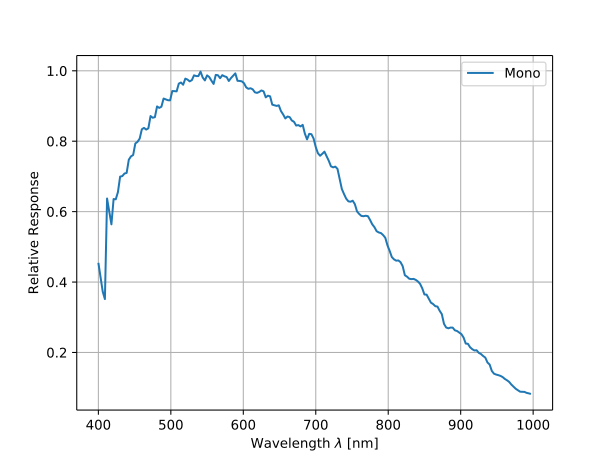
スペクトル応答曲線には、レンズ特性は含まれません。
機械的仕様#
の寸法と取り付けポイント#
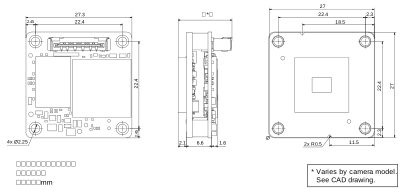
– お使いの Basler カメラの CAD/テクニカル図面をダウンロードしてください。
情報
カメラマウントを使用する場合は、異なる寸法が適用されます。詳細については、dart M Camera Mountsを参照してください。
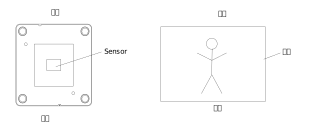
上の画像に示されているイメージセンサーの上部と下部は、出力画像の上部と下部にそれぞれ対応しています (下記参照)。
取り付け方法#
→ 取り付け方法参照。
応力試験結果#
→ 応力試験結果参照。
要件#
環境要件#
温度と湿度#
| 説明 | 温度 |
|---|---|
| 動作中のデバイス温度 | 0~75°C(32~167°F)a |
| 保管中のデバイス温度 | -20~80°C(-4~176°F) |
| 湿度 | 20~80%、相対、非結露 |
-
温度測定ポイント(ボード上の最も高温の箇所)で測定された温度。この箇所は、ボード上の他の部品よりもかなり高温です。
熱放散対策#
注意 – 指定された範囲外の温度は、火傷の原因になったり、カメラのシャットダウンを引き起こしたりする可能性があります。
カメラ仕様に記載されている範囲外の温度でカメラモジュールを動作させると、次のような問題が発生します:
- カメラモジュールが高温になり、触ると火傷をするおそれがあります。
- 放熱を行わずにカメラモジュールを動作させると、電気部品を保護するためにカメラモジュールがシャットダウンする場合があります。
- カメラモジュールの寿命が短くなります。
十分に放熱してください。
→ 熱放散の確保を参照してください。
→ アプリケーションノートdart M カメラモジュールの効率的な熱放散の確保方法を参照してください。
電気的要件#
カメラの電源要件については、上記の一般仕様テーブルを参照してください。
→ カメラモジュールをBasler ハードウェアに接続する場合は、dart M Interface Boardsまたはdart M GigE Switchを参照してください。
→ カメラモジュールをカスタムハードウェアに接続する場合は、dart M Interface Descriptionを参照してください。
物理インターフェイス#
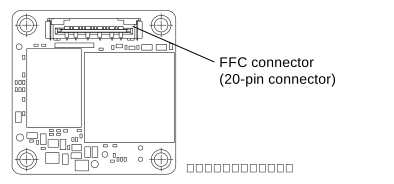
FFCコネクター#
FFC コネクタは、dart M FFC ケーブルを介してdart M Interface Boardまたはdart M GigE Switchへのインターフェイスを提供します。
注記 – FFC ケーブルの向きを間違えると、電子回路が破損するおそれがあります。
FFC ケーブルの両端に区別はありません。つまり、どちらの端もカメラモジュールのコネクタ、またはインターフェイスボードや dart M GigE スイッチのコネクタに接続できます。ただし、ケーブルを正しい向きで挿入することが重要です。つまり、次の画像に示すように、FFC ケーブルの赤い導電パスがボード側を向くようにする必要があります。画像はインターフェイスボードの例を示していますが、スイッチの場合も同じ原則が適用されます。
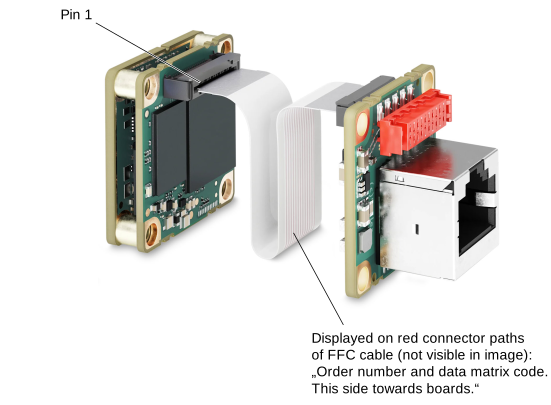
カスタムハードウェアを接続することもできます。詳細については、dart M Interface Descriptionを参照してください。
I/O ピン配列#
→ カメラモジュールをBasler ハードウェアに接続する場合は、dart M Interface Boardsまたはdart M GigE Switchを参照してください。
→ カメラモジュールをカスタムハードウェアに接続する場合は、dart M Interface Descriptionを参照してください。
注意事項#
→ 安全に関する注意事項(dartカメラ)参照。
インストール#
→ カメラの取り付け参照。
機能#
→「機能」を参照。