Demultiplexer vTool#
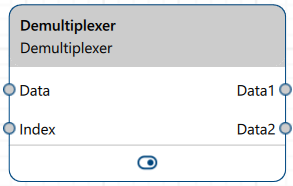
Demultiplexer vToolは、Data入力ピンでデータを受け入れ、DataN出力ピンを介して収集されたデータを出力します。必要な数だけ出力ピンを指定できます。Data入力ピンのデータ型はジェネリックです。出力ピンは、提供された入力のデータ型を採用します。
Index入力ピンを使用すると、受信データアイテムをデフォルト以外の出力ピンにルーティングできます。Mini Script vToolを使用してインデックス情報を提供できます。
Demultiplexer vToolを使用するには、pylon Software Suiteをダウンロードしてください。
仕組み#
Demultiplexerは、Data入力ピンで単一のvToolから任意のデータ型の入力を受け入れます。収集する個別のデータアイテム(更新)の数と、各データアイテムを複数の出力ピンを介して個別に出力するか、単一の出力ピンを介して1つの配列にまとめて出力するかを指定できます。
vToolは、受信した値をスロット(データアイテムごとに1つのスロット)に格納します。Blockwise Operating Modeでは、すべてのスロットが埋まるまでデータはメモリ内に保持され、その後すべてがまとめて出力されます。Continuous Operating Modeでは、新しいデータアイテムごとに、現在満たされているスロットまでを含むすべてのスロットの出力をトリガーできます。詳細については、以下のConfiguration SettingsのOperating Modeを参照してください。
受信データを出力ピンにルーティングする#
内部インデックスは、対応するスロットを介してデータアイテムを出力ピンにルーティングするために使用されます。デフォルトでは、受信したデータアイテムはこのインデックスに従って出力ピンにルーティングされます。最初に到着したアイテムが最初のスロットに送られ、さらに最初の出力ピンに送られます。この内部Counterは0から始まり、レシピが開始されるたびに0にリセットされます。
DemultiplexerのIndex入力ピンを接続すると、内部インデックスを上書きし、受信データアイテムを目的の出力ピンにシフトできます。
内部インデックスを上書きするもう1つの方法は、Offsetオプションを使用することです。指定されたオフセット値が内部Counterに追加され、受信データにシフトが発生します。
Example: 3つのスロットが設定されており、オフセットに1を指定した場合。これにより、スロット/出力ピン1に行くはずだったデータアイテムが、スロット/出力ピン2に送信されます。データアイテム2はスロット/出力ピン3に行きます。データアイテム3はラップアラウンドして、スロット/出力ピン1に行きます。
このラップアラウンド動作は、オフセット値が設定されたスロットの数よりも高い場合にも発生します。
構成設定#
- Operating Mode: これにより、受信したデータアイテムが出力される方法が決定されます。
- Blockwise: 受信したデータアイテムが収集され、同時にまとめて出力されます。個々のアイテムは、指定された数のデータアイテムが収集されるまでスロットに保持されます。Number Of Slotsパラメータを使用して、収集するデータアイテムの数を指定します。
- Continuous: 受信したデータアイテムごとに、現在満たされているスロットを含むすべてのスロットからのデータの出力がトリガーされます。つまり、最初のデータアイテムが到着して最初のスロットを満たすと、すぐにそれが出力されます。2番目のデータアイテムが到着すると、1番目のアイテムと2番目のアイテムが一緒に楽に出力され、以下同様になります。Number Of Slotsパラメータを使用して、収集するデータアイテムの数を指定します。すべてのスロットが少なくとも1回満たされた後も、以降の各受信データアイテムは、すべてのスロット値を含む出力を引き続きトリガーします。スロットへのルーティングは、内部インデックス、Index入力、またはOffsetパラメータ値に従って続けられます。
- Output Mode: これにより、受信したデータアイテムを個別に出力するか、配列として出力するかを決定します。
- Individual: 受信したデータアイテムが個別に出力されます。各受信データアイテム専用の出力ピンがあります。Number Of Slotsパラメータ値によって、出力ピンの数が決まります。
- Array: 受信したデータアイテムが配列として出力されます。すべてのデータアイテムを保持する出力ピンが1つあります。Data入力ピンのデータ型が配列である場合、このモードは使用できません。
- Number Of Slots: スロット数、つまり収集して出力したいデータの希望数を指定するには、このパラメータを使用します。Individual出力モードでは、これも作成される出力ピンの数になります。Array出力モードでは、これが配列内のアイテム数になります。
- Offset: オフセットを指定することで、入力されたデータアイテムを希望のスロットおよび対応する出力ピンにシフトできます。デフォルトでは、入力データアイテムは内部インデックスに従って出力ピンにルーティングされます。Offsetパラメータが0に設定されている場合、入力データアイテム1はスロット/出力ピン1に送信され、データアイテム2はスロット/出力ピン2に送信されます(以下同様)。詳細については、Routing Incoming Data to Output Pinsを参照してください。
- Index入力ピン: この入力ピンをたとえばMini Script vToolに接続して内部のCounterをオーバーライドし、入力データアイテムを希望の出力ピンにルーティングします。このピンが接続されていない場合や入力を受信しない場合は、内部のCounterが使用されます。Indexピンにエラーがあり、同じアップデートでData入力ピンに入力があった場合、その入力は破棄されます。詳細については、Routing Incoming Data to Output Pinsを参照してください。
vToolの設定#
Demultiplexer vToolを設定するには、Workbenchでダブルクリックします。利用可能なすべての設定が表示されたダイアログが開きます。あるいは、Features - Allペインでも同じ設定を確認できます。
入力#
Data#
任意のデータ型の入力を受け付けます。
- データ型: 初期状態はValueです。接続が確立されると、接続されている出力ピンのデータ型を引き継ぎます。
索引#
- データ型: 内部のCounterをオーバーライドするための整数入力を受け付けます。
出力#
DataN#
対応するスロットに保持されている入力を返します。
- データ型: 初期状態はValueです。接続が確立されると、Data入力ピンのデータ型を引き継ぎます。
Array#
1つの配列で受信したデータアイテムを返します。
- データ型: 初期状態はValueです。接続が確立されると、要素がData入力ピンのデータ型に一致する配列型になります。
関連するvTools#
典型的な先行機#
- カメラvTool
- Image Loading vTool
- Mini Script vTool(Index入力用)
典型的な後継機#
- Data入力ピンで提供されるデータ型を受け入れる任意のvTool(レシピの必要に応じて、各DataN出力またはArray出力に接続します)。