Array Creator vTool#
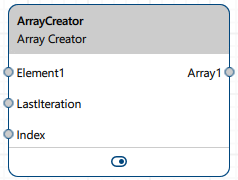
Array Creatorは、Element入力ピンを介して画像や領域などのさまざまなタイプの要素を受け入れ、Array出力ピンを介して結合された要素を出力します。
Array Creator vToolを使用するには、pylon Software Suiteをダウンロードしてください。
仕組み#
Array Creatorは、レシピ内での柔軟な配列処理のためにArray Element Iteratorと組み合わせて使用するように設計されていますが、他のvToolと単体で使用することもできます。
更新ごと(つまり、Element入力ピンにデータが到着するごと)に、Array Creatorはインデックスを読み取り、各Element入力ピンの値に対応する出力配列のその位置に書き込みます。特定の位置のインデックスに値が複数回書き込まれた場合は、最も新しく受信した値が以前の値を上書きします。最大100個のElement入力ピンを作成できます。同じ数のArray出力ピンが作成されます。
Index入力ピンは、各新しい要素に対応する出力配列内の書き込み位置を指定します。LastIteration入力ピンはシーケンスの終了を通知し、その時点で収集された配列が出力されます。
Array出力ピンのデータ型は、Element入力ピンで入力されたデータ型と同じになります。
情報
Array Element Iteratorを使用する場合、Array Creatorを正常に動作させるには、LastIterationおよびIndex入力ピンを接続する必要があります。これらのピンがないと、vToolは受信した要素を書き込む位置や、収集した配列を出力するタイミングを判別できません。いずれかのピンが未接続のままの場合、すべての更新で配列レベルのエラーが発生し、すべての出力データの収集が行われません。
LastIteration入力ピンでtrueを受信し、Index入力ピンで有効な入力を受信した場合、受信した要素は通常どおり保存され、すべての配列が出力されます。LastIteration入力ピンでtrueを受信したもののIndex入力が受信されなかった場合、Element入力ピンからの値は無視され、これまでに収集されたすべての値をそのまま含む配列が出力されます。出力後、すべての内部配列は空にリセットされます。
エラーハンドリング#
必要な接続がありません: LastIterationまたはIndex入力ピンのいずれかが接続されていない場合、すべての更新ですべての出力ピンに配列レベルのエラー(LastIterationとIndexの両方の入力ピンを接続する必要があります。)が発生し、データは収集されません。
エラーを伴うLastIteration: LastIteration入力ピンがエラー状態の値を受信した場合、Array Creatorはすべての出力ピンに配列レベルのエラー(エラーを含む要素がLastIteration入力で受信されました)を出力し、内部状態をリセットします。
最後の反復での無効なインデックス: LastIterationピンでtrueを受信し、Indexの値が無効である(負の値、設定されたMaximum Number Of Elementsの制限を超えている、またはエラー状態である)場合、すべての出力ピンに配列レベルのエラー(インデックスが範囲外です)を持つ配列が出力されます。以前に収集された値はすべて破棄されます。
最後以外の反復での無効なインデックス: LastIterationピンでfalse(または値なし)を受信し、Indexの値が無効である(負の値、設定されたMaximum Number Of Elementsの制限を超えている、またはエラー状態である)場合、Array Creatorはエラーをログに記録し、その更新を無視します。以前に収集された値は保持されます。
入力ピンのエラーを含む要素: エラー状態を持つ受信要素は、有効な値とは異なって扱われることはなく、そのまま透過的に出力配列に転送されます。
初期化されていない位置: Index入力によって出力配列にギャップが生じた場合(例:インデックスが0から3にジャンプする)、中間位置(例:1、2)にはエラー値(この位置で要素が受信されませんでした。)が埋められます。
vToolの設定#
Array Creator vToolを設定するには、Workbenchでそれをダブルクリックします。利用可能なすべての設定が表示されたダイアログが開きます。または、Features - Allペインでも同じ設定を見つけることができます。
入力#
ElementN#
任意のvToolからのデータを受け入れます。ピンのデータ型は、提供された最初の入力に自動的に適応します。すべての単純データ型(String、Float、Boolean、Integer、PointF2Dなど)がサポートされますが、配列型はサポートされません。
- データ型:Boolean、CircleF、EllipseF、Float、Image、Integer、LineF、PointF、RectangleF、Region、String、Transformation Data
LastIteration#
Array Element Iteratorからの、現在の要素が配列を完了する最後の要素であるかどうかを示すtrueまたはfalseを受け入れます。trueを受け取ると、Array Creatorは収集した配列を出力し、次のシーケンスの準備のために内部バッファをリセットします。更新時にこのピンで値が受信されない場合、vToolはfalse(最後のイテレーションではない)とみなします。
- データ型: Boolean
索引#
ElementN入力ピンで受信した入力に関連するインデックス位置(整数)を受け入れます。その後、要素は出力配列内の対応するインデックス位置に書き込まれます。受信したインデックスが配列の現在のサイズを超える場合、配列のサイズはそれに応じて変更されます。使用されていない位置にはエラー値がFillされます。
- データタイプ:整数
出力#
ArrayN#
Element入力ピンごとに1つの配列を返します。この配列には、イテレーションシーケンス全体で対応する入力ピンから収集されたすべての値が含まれます。LastIteration入力ピンでtrueを受信すると、配列が出力されます。一度も書き込まれなかった位置の要素にはエラー値がFillされます。
- データ型: 対応するElementピンを介して入力されたデータ型の配列