Switch dart M、GigE、2ポート、AUX#
情報
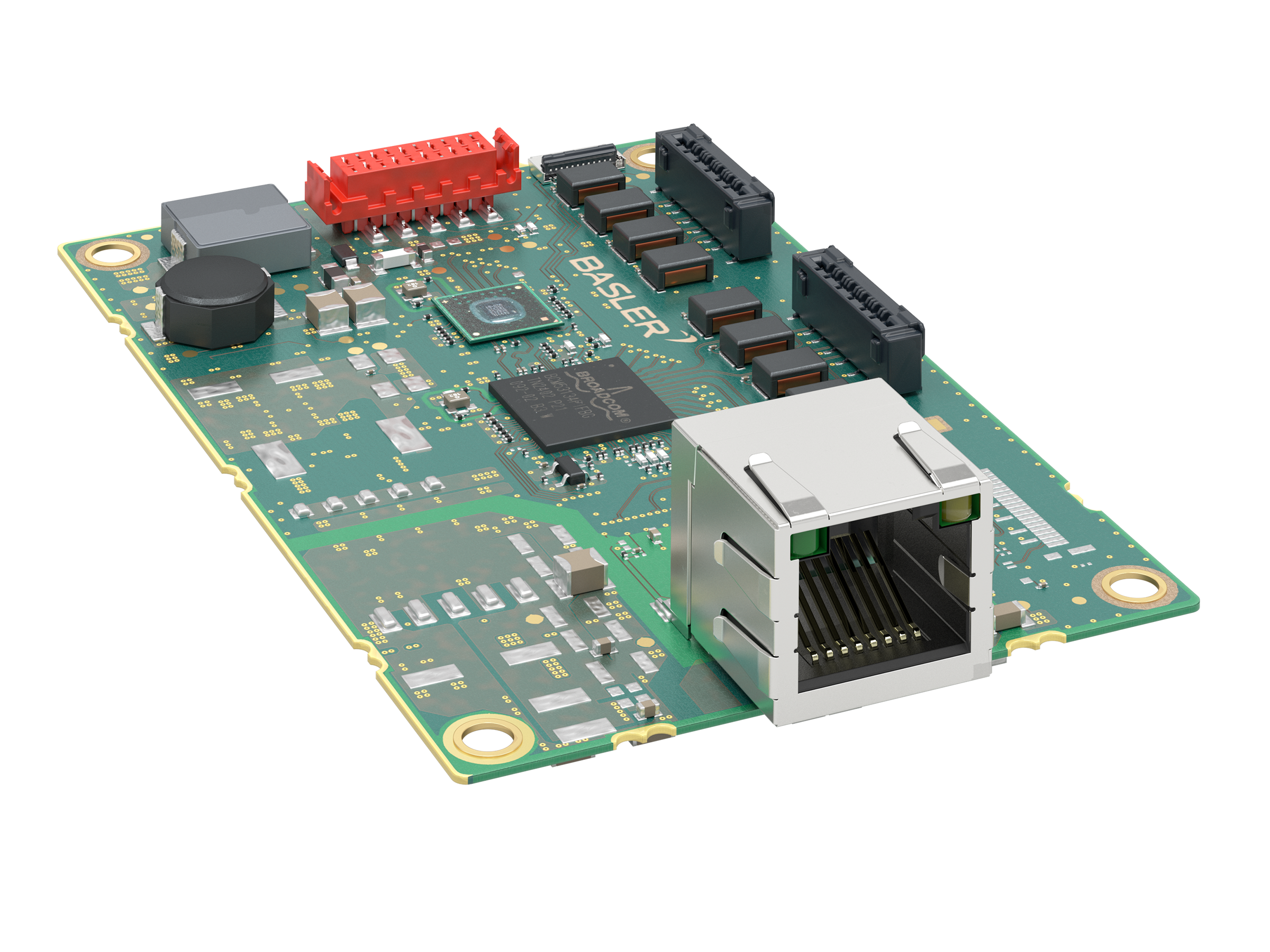
Basler dart M GigE カメラモジュールを Basler dart M GigE スイッチで使用する場合、Interface Board dart M GigE RJ45 AUX の代わりに dart M GigE スイッチが使用されます。
dart M GigE スイッチを使用する場合、I/O回路はスイッチ上に配置されます。回路図(dart M GigE スイッチ)のトピックを参照してください。
主な機能#
- 高速データ転送のために、dart M GigE カメラモジュールを LAN 内に接続します
- すべての Basler dart M GigE カメラモジュールで使用可能
- 最大 1 Gbit/s の帯域幅
- 1台のスイッチ上で最大2台の dart M GigE カメラモジュールに1本のデータケーブルだけでアクセス可能
- スイッチの I/O コネクタを介してカメラモジュールの GPIO にアクセス可能
- ジャンボフレームに対応
仕様#
一般仕様#
| 仕様 | Switch dart M, GigE, 2 Port, AUX |
|---|---|
| 注文番号 | 109788 |
| ポートの数 | 2 |
| I/Oライン | 汎用入力(GPI)ライン x 2 汎用出力(GPO)ライン x 2 汎用入出力(GPIO)ライン x 2 |
| インターフェース | GigE、1000 Mbit/s |
| 電源 | 12~24 VDC(最大 25 W) |
| 消費電力 | ユースケースによって異なります。 ユースケース別の消費電力を参照してください。 |
| サイズ | 56.0 x 85.0 x 20.7 mm |
| 重量 | <50 g |
| サポートされている規格 | IEEE 802.3 IEEE 802.3at PoE+ IEEE 802.3ab(1000BASE-T Gigabit Ethernet) IEEE 802.3u(100BASE-TX Fast Ethernet) IEEE 802.3x(全二重フロー制御) |
| 適合性 | CE(RoHS対応を含む)、UKCA、FCC、KC |
| 最大パケットサイズ | 最大 9720 バイト |
ジャンボフレーム
- カメラのパケットサイズを 1,500 バイトより大きくする場合は、すべてのネットワークデバイスでジャンボフレームのサポートを有効にする必要があります。有効にしないと、パケットがブロックされてストリーミングが失敗する可能性があります。
- ジャンボフレームの最大パケットサイズを使用する場合は、説明に従ってネットワークアダプターを最大値に設定します。 ネットワークの設定(GigEカメラ) トピック。また、
GevSCPSPacketSizeパラメーターを最大サイズに設定します。ほとんどの Basler dart M GigE カメラモジュールは、最大 8192 バイトのパケットサイズのみをサポートします。
機械的仕様#
の寸法と取り付けポイント#
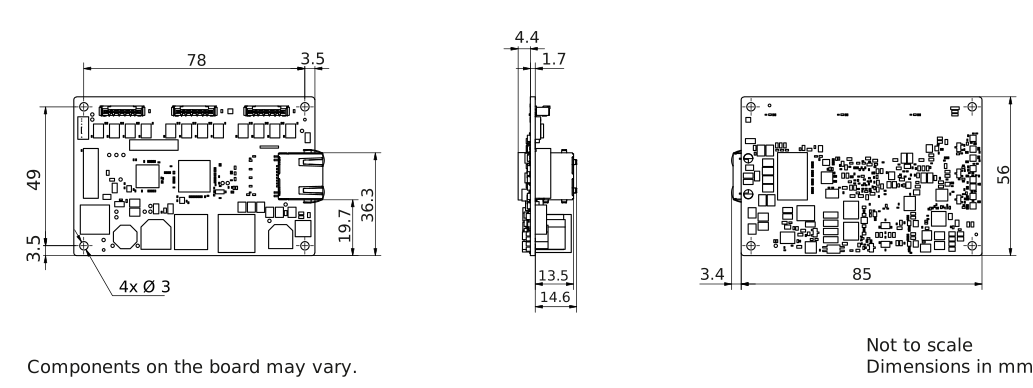
→ スイッチのCAD/技術図面をダウンロードしてください。
環境要件#
温度測定ポイント#
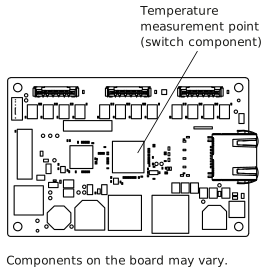
温度と湿度#
| 動作中のDevice Temperature | 0~70 °C(32~158 °F) 温度測定ポイントを参照してください。 |
| 保管中のDevice Temperature | 0~80 °C(32~176 °F) |
| 湿度 | 20~80%、相対、非結露 |
Basler dart M GigEスイッチはハウジングなしで納品されます。
警告 – 火傷の危険
動作中、GigEスイッチのコンポーネントは高温になります。スイッチの電源が入っているときにスイッチやコンポーネントに触れると、火傷の原因になることがあります。
動作中にスイッチの高温部に触れられないように対策を講じてください(スイッチをハウジングに組み込むなど)。
注記 – 指定範囲外の温度は、dart M GigEスイッチを損傷するおそれがあります。
仕様表に記載されている範囲外の温度でスイッチを操作すると、次のような問題が発生します。
- dart M GigEスイッチが損傷するおそれがあります。
- スイッチの寿命が短くなります。
スイッチコンポーネントの温度を70 °C(158 °F)未満に維持してください。
十分な放熱を行ってください。Temperature Measurement Pointを参照してください。
電気的要件#
注記 – EMI保護がない場合、スイッチが誤動作するおそれがあります。
電磁妨害(EMI)に対する保護なしでスイッチを操作すると、スイッチが誤動作するおそれがあります。
スイッチをハウジングに組み込むなど、EMI問題を防止するための対策を講じてください。
詳細については、Avoiding EMI and ESD Problemsを参照してください。
電源#
電源はI/Oコネクタ経由で供給する必要があります。Switch dart M, GigE, 2 Port, AUXはPoEをサポートしていません。
動作電圧は12~24 VDC(最大25 W)です。最低10.8 VDCを供給する必要があります。デバイスの損傷を防ぐため、30 VDCを超えないようにしてください。
通知 – 指定範囲外の電圧はスイッチを損傷するおそれがあります。
General Specifications表に記載されている安全な動作電圧範囲内で電源を供給する必要があります。
ユースケース別の消費電力#
次の表は、さまざまなユースケースにおける一般的な消費電力値を示しています。
| 使用事例 | 消費電力(W) |
|---|---|
| dart Mカメラモジュールなしのスイッチ、LANに接続 | 1.1 |
| 2台のdart Mカメラモジュールを搭載したスイッチ、画像取得なし | 6.0 |
| 2台のdart Mカメラモジュールを搭載したスイッチ、画像取得中、最大帯域幅 | 8.0 |
汎用I/Oレンズ#
注意:GPIO回線に不適切な電気信号を入力すると、ボードが重大な損傷を受けるおそれがあります。
以下に指定されたとおりに、適切な入力または出力信号電圧を印加してください。
入力として動作#
| 電圧 | 説明 |
|---|---|
| 30VDC | 絶対最大定格。この電圧を決して超えてはなりません。超えた場合、ボードが破損し、保証が無効になることがあります。 |
| 0–24VDC | 安全動作範囲。最小外部プルアップ電圧はDC 3.3V。 |
| 0–0.8VDC | 論理0を示します(インバータは無効)。 |
| 0.8–2.0VDCより大きい | 論理レベルの遷移が発生する領域。この領域で論理状態は定義されません。 |
| 2.0VDCより大きい | 論理1を示します(インバータは無効)。 |
- Input current (high-level): <100 μA
- Input current (low-level): <5 mA sink current from the GPIO input line without exceeding 0.8 VDC.
出力として動作#
| 電圧 | 説明 |
|---|---|
| 30VDC | 絶対最大定格。この電圧を決して超えてはなりません。超えた場合、ボードが破損し、保証が無効になることがあります。 |
| 3.3–24VDC | 安全な動作範囲 |
| <3.3 VDC | 信頼性の低い GPIO 出力 |
- 内部プルアップ抵抗:約650Ω(オープンコレクター)。多くのアプリケーションでは、プルアップ抵抗を追加する必要があります。
- Residual voltage ("on" state): 50mAおよび25°C(77°F)のハウジング温度で約0.4VDC。実際の残留電圧は、動作温度、負荷電流、および電子部品の生産展開に依存します。
- Leakage current: <60 µA. Actual leakage depends on operating temperature and production spread of electronic components.
- 最大負荷電流:50mA
- 最小負荷電流: :指定なし。次の点を考慮してください。
- 漏れ電流は、負荷電流が低い場合にはより強い影響を与えます。
- 負荷電流が減少すると、出力の伝播遅延が増加します。
- 高インピーダンス回路は、EMIの影響を受けやすい傾向があります。
- 電流が大きいほど、長いケーブルでの電圧降下が大きくなります。
I/Oラインの詳細については、I/O制御の項を参照してください。
ケーブル要件#
Ethernetケーブル#
- 高品質のEthernetケーブルを使用します。S/STPシールド付きのCat 5e以上のケーブルを使用することを推奨します。
- ストレート(パッチ)またはクロスオーバーEthernetケーブルのいずれかを使用してください。
- 強い磁場に近接しないようにしてください。
- Baslerは、Baslerケーブル製品ラインナップのEthernetケーブルを使用することを推奨します。
I/Oケーブル#
- I/Oケーブルの断面積は、少なくとも0.09 mm²(AWG28に近い値)が必要です。
- I/Oケーブルは電源供給に使用されます。
- 最大ケーブル長10 mを超えてはなりません。
- 推奨コネクタ:TE 1-338095-0(圧着タイプ)またはWR-MM 690157001072(リボンタイプ)
- 強い磁場の近くでは使用しないでください。
- Baslerでは、dart M I/Oケーブルの使用を推奨しています。
フラットフィールドケーブル(FFC)#
Baslerでは、dart Flexible Flat Cableの使用を推奨しています。
注記 – FFC ケーブルの向きを間違えると、電子回路が破損するおそれがあります。
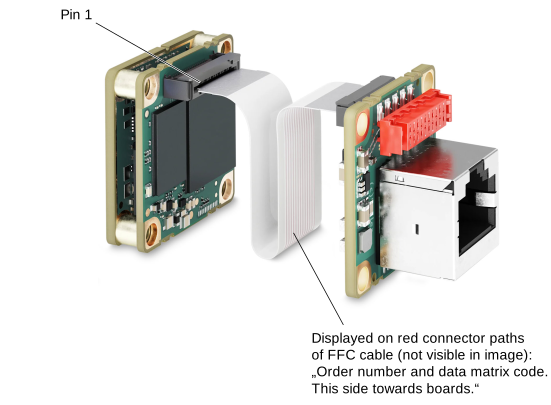
FFCケーブルの両端に向きはありません。つまり、どちらの端もカメラモジュールコネクタまたはdart M GigEスイッチのコネクタのどちらにでも接続できます。ただし、ケーブルを正しい向きで挿入することが重要です。つまり、次の図に示すように、FFCケーブルの赤い導電パスがボード側を向くようにする必要があります。この図はインターフェースボードの例を示していますが、スイッチでも同じ原則が適用されます。
物理インターフェイス#
コネクター#
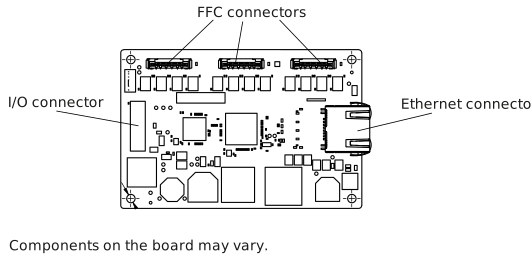
Ethernetコネクター#
- スイッチへの100/1000 Mbit/sイーサネット接続
- 8ピンRJ45ジャック 8ピン
注意 – イーサネットコネクタに機械的なストレスが加わると、スイッチが破損するおそれがあります。
イーサネットコネクタ(RJ45ジャック)に機械的なストレスが加わる場合は、dart M GigEスイッチの機械的破損を防ぐため、ケーブルのストレインリリーフを設けてください。
機械的負荷を回避する方法については、取り付け手順トピックのRJ45コネクタのストレインリリーフの確保セクションを参照してください。
FFCコネクター#
- 20ピンHirose FH67(FH67-20S-0.5SV)FFC/FPCコネクタ
- dart FFC(Flexible Flat Cable)を介してdart M GigEカメラモジュールへのインターフェースを提供します。
I/Oコネクター#
10ピンメスコネクタ:WR-MM 10ピン(690367291076)。詳細については、I/O Connector Pinoutを参照してください。
I/Oコネクタのピン配列
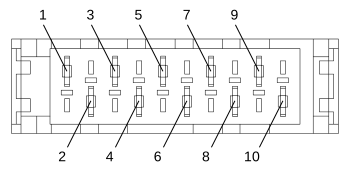
| ピン | 説明 |
|---|---|
| 1 | AUX電圧およびI/Oラインのグランド |
| 2 | 外部印加されるAUX電圧 |
| 3 | AUX電圧およびI/Oラインのグランド |
| 4 | 外部印加されるAUX電圧 |
| 5 | 汎用I/O(GPIO)ライン CAM 2 |
| 6 | 汎用I/O(GPIO)ライン CAM 1 |
| 7 | CAM 2用汎用出力(GPO)ライン |
| 8 | CAM 1用汎用出力(GPO)ライン |
| 9 | CAM 2用汎用入力(GPI)ライン |
| 10 | CAM 1用汎用入力(GPI)ライン |
ステータスLED#
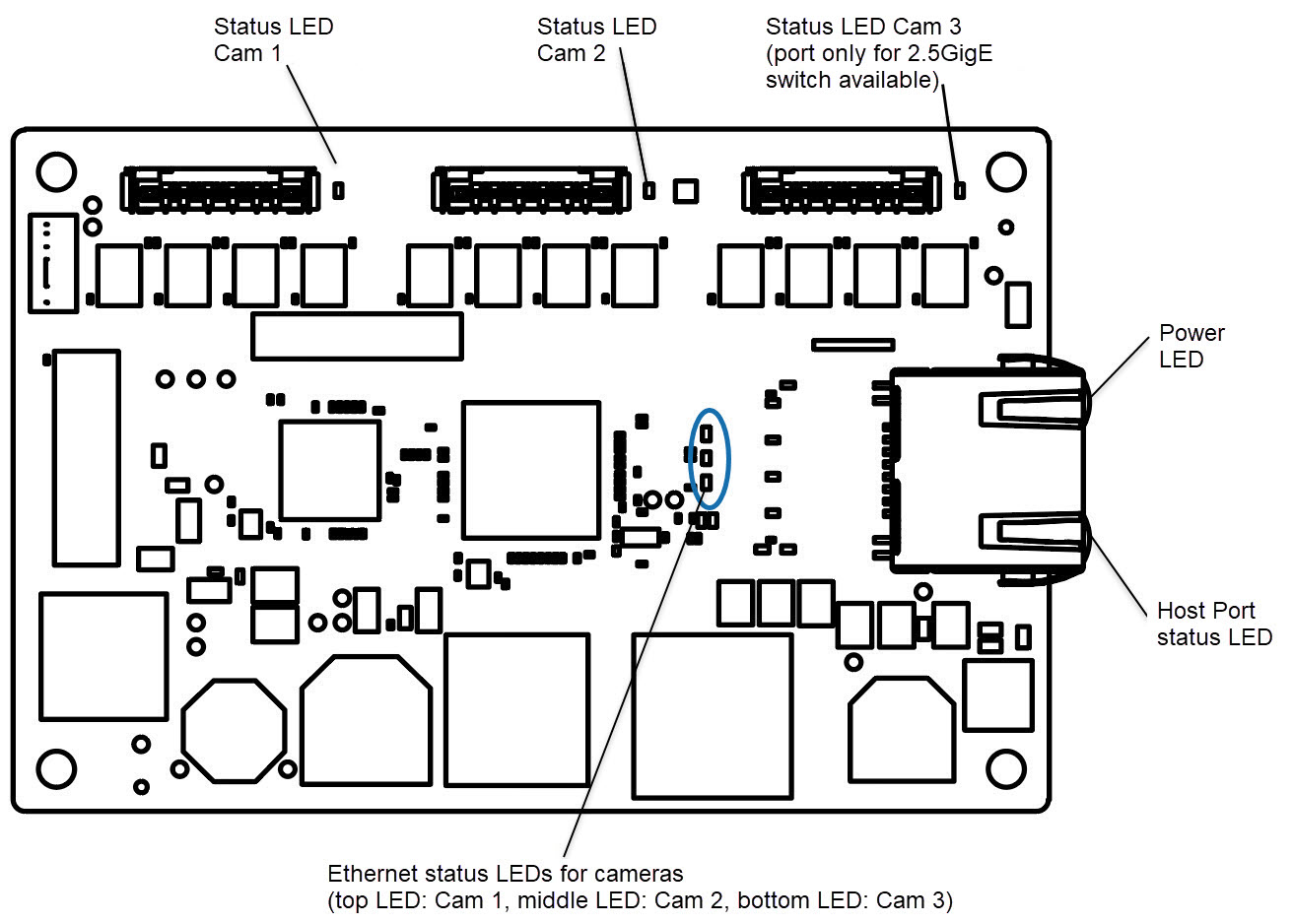
dart M GigEスイッチには、次のステータスLEDがあります。
カメラステータスLED
カメラステータスLED(上の図のStatus LED Cam 1~3)は、接続されているBasler dart M GigEカメラモジュールのステータスを示します。
さまざまなカメラステータスについては、dart Mインターフェイス説明トピックのLEDの状態テーブルを参照してください。
電源LED
| LEDステータス | 意味 |
|---|---|
| Off | 電源なし |
| 緑色で点灯 | 電源オン、イーサネット接続確立済み |
ホストポートステータスLED
| LEDステータス | 意味 |
|---|---|
| オレンジ色で点灯 | ホストコンピューターとGigEスイッチ間のリンクが確立されています |
| オレンジ色の点滅 | ホストコンピューターとGigEスイッチ間での通信アクティビティを示します |
イーサネットポートステータスLED
FFCコネクタを介してdart M GigEスイッチに接続された各カメラモジュールについて、対応するイーサネットポートステータスLEDが次の状態を示します。
| LEDステータス | 意味 |
|---|---|
| Off | カメラモジュールがスイッチに接続されていません |
| 緑色で点灯 | カメラモジュールがスイッチに接続されています |
| 緑色の点滅 (間隔が広い/点滅) | カメラモジュールがスイッチに接続されています pylonソフトウェアとの接続が確立されています |
| 緑色の点滅 (非常に高速な点滅) | カメラモジュールがスイッチに接続されています pylonソフトウェアとの接続が確立されています 画像取り込みが開始されました。 |
詳細情報#
- さまざまなdart M GigEカメラモデルについては、Basler dart M概要トピックを参照してください。
- 「ハードウェアのインストール(GigEカメラ)」トピックのdart Mカメラセクションを参照してください。
- dart Mインターフェイス説明トピックを参照してください。
- 回路図(dart M GigEスイッチ)トピックを参照してください。
- その他のBasler dart M GigEアクセサリーも参照してください。
- ネットワーク設定(GigEカメラ)を参照してください。
- ネットワーク関連パラメータを参照してください。