Camera vToolでGigEカメラが表示されない#
問題#
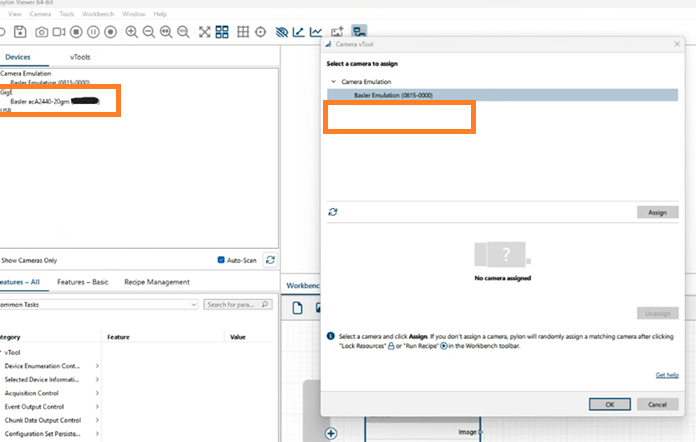
pylon Workbenchで作業中にカメラをCamera vToolに割り当てようとしましたが、カメラリストに表示されません。ただし、pylon Viewerでは表示されます。
解決策#
カメラのIP設定を確認してください。接続されているネットワークアダプターとサブネットマスクが一致していないか、カメラがネットワークアダプターとは異なるサブネットに存在する可能性があります。
pylon Viewerはpylon Workbenchとは異なる実装を採用しており、ブロードキャストを実行してカメラを検出しリスト表示するため、カメラが表示されます。一方、Workbenchはこのカメラ検出戦略を採用しておらず、ネットワークアダプターと同じサブネット内にあるカメラしか検出しません。
正しいIP設定の例:
- カメラのIPアドレス: 192.168.50.10 / サブネットマスク: 255.255.255.0
- ネットワークアダプターのIPアドレス: 192.168.50.1 / サブネットマスク: 255.255.255.0
正しいIP設定の方法の詳細については、Basler製品ドキュメントを参照してください。
または、pylon GigE Configuratorを使用してIP設定を自動的に変更してください。